> ## Documentation Index
> Fetch the complete documentation index at: https://docs.dfns.co/llms.txt
> Use this file to discover all available pages before exploring further.
# HSM deployment runbook
> Step-by-step operational runbook for deploying, configuring, and managing a DFNS HSM signer integration in your own infrastructure.
export const SupportLink = ({children}) => {
const url = "https://support.dfns.co";
return {children || url};
};
This runbook provides the detailed steps to deploy a Hardware Security Module (HSM) integration with DFNS. For an overview of HSM architecture, key generation and signing flows, and the HSM Driver, see the [HSM signing infrastructure](/advanced/deployment-models/hsm) page.
## Prerequisites
Before starting the integration, ensure the following are in place:
* **DFNS account**: An active DFNS organization with the HSM deployment model enabled. Contact our Support Team if this has not been configured.
* **HSM hardware or service**: A PKCS#11-compatible HSM, either physical (e.g. Thales Luna 7, Utimaco CryptoServer, Securosys Primus) or cloud-based (e.g. AWS CloudHSM, Azure Dedicated HSM). If using a physical HSM, it should be mounted and network-accessible.
* **Host server**: A server (physical or virtual) that can run the HSM Driver:
* Network connectivity to the HSM (e.g. TCP port 1792 for Thales Luna).
* Outbound HTTPS connectivity to the internet (to reach DFNS APIs).
* A supported OS: Linux (x86\_64) or Windows Server (x64).
* Sufficient resources to run the HSM Driver process and a database instance.
* **Database**: A PostgreSQL instance (or equivalent supported database) accessible from the host server. This can be co-located on the same host or run separately.
## Implementation steps
This step is your responsibility. To maintain clear separation of concerns, DFNS does not participate in HSM procurement, setup, key ceremony, or administration.
1. **Provision the HSM**: For a physical HSM, get the appliance ready. For a cloud-based HSM (e.g. AWS CloudHSM, Azure Dedicated HSM), provision the cluster in your cloud account.
2. **Initialize the HSM**: Set Security Officer credentials, create an application partition, initialize it for PKCS#11, and set the Crypto Officer PIN.
3. **Perform the key ceremony**: Generate the master key (also called a wrapping key) within the partition. This key is used to encrypt all wallet private keys.
Losing the master key means losing access to all wallets and the assets they hold. Back it up immediately after generation.
4. **Connect the host server to the HSM**: Establish a secure connection, including any required certificate exchange (e.g. NTLS for Thales Luna). For cloud-based HSMs, this typically involves VPC networking and the vendor's client agent.
If using multiple HSMs for redundancy, all HSMs must share the same master key. Consult your HSM vendor's documentation for master key replication or cloning procedures.
Each HSM requires a dedicated host server running the HSM Driver. If you deploy multiple HSMs for redundancy, provision one host server per HSM.
The HSM and its host server should be deployed in a physically secure, access-controlled environment (e.g. a private data center, a secured server room, or an equivalent cloud environment with strict network isolation).
1. **Network connectivity**:
* The host must reach its paired HSM over the network via PKCS#11 (e.g. TCP 1792 for Thales Luna NTLS).
* The host must have outbound HTTPS (TCP 443) access to the internet to reach DFNS APIs.
* If your security policy requires it, configure firewall rules to restrict outbound traffic to DFNS API endpoints only.
2. **Operating system**: Install a supported Linux distribution (e.g. Ubuntu 22.04+, RHEL 8+) or Windows Server.
3. **Database**: Set up a PostgreSQL instance accessible from all host servers. This can run on one of the hosts or on a dedicated database server. Ensure the database is backed up regularly.
Contact our Support Team to obtain the HSM Driver. It is available in the following formats:
* **Docker container image**: for containerized environments (Kubernetes, Docker Compose, ECS, etc.)
* **Standalone binary**: for bare-metal or VM deployments without container orchestration
DFNS will provide access to the appropriate artifact along with configuration documentation.
HSM Driver needs to use HSM PKCS#11 library and its associated configuration file to communicate with the HSM.
Contact HSM's vendor to obtain the PKCS#11 library:
1. **PKCS#11 library**: download the PKCS#11 library from vendor's support website
2. **Generate configuration file**: use vendor's HSM tooling to generate configuration file (e.g. `clientConfig` for Thales Luna).
The configuration file points to the right HSM and partition.
Library and configuration file are passed to HSM Driver as arguments.
Communication between the HSM Driver and DFNS APIs is secured with mutual TLS (mTLS). The certificate setup is a collaborative process between you and DFNS.
```mermaid theme={null}
sequenceDiagram
participant Customer
participant DFNS
DFNS->>Customer: 1. Provide CSR template
Customer->>Customer: 2. Generate private key + intermediate CSR
Customer->>DFNS: 3. Send intermediate CSR
DFNS->>DFNS: Review and sign intermediate certificate
DFNS->>Customer: 4. Return signed intermediate certificate
Customer->>Customer: 5. Generate leaf certificates (per HSM Driver)
Customer->>Customer: 6. Install leaf cert + key + chain on each HSM Driver
```
**Detailed procedure:**
1. **DFNS provides a CSR template**: DFNS sends you a Certificate Signing Request template specifying the required fields (subject, extensions, key usage, etc.).
2. **You generate an intermediate certificate signing request**: Using the CSR template, you generate a private key and create a signing request for an intermediate certificate.
3. **You send the intermediate CSR to DFNS**: DFNS reviews and signs the intermediate certificate, chaining it to the DFNS trust root.
4. **DFNS returns the signed intermediate certificate**: You now have a signed intermediate certificate that is trusted by the DFNS API.
5. **You generate leaf certificates**: For each HSM Driver instance, you generate a leaf certificate signed by your intermediate certificate. This allows you to independently add or rotate HSM Driver instances without involving DFNS each time.
6. **Configure the HSM Driver**: Install the leaf certificate, its private key, and the certificate chain on each HSM Driver host.
**1. Configuration**
The HSM Driver is configured via environment variables or command line arguments. The following options are available:
**PKCS#11 settings**
The HSM Driver already embeds IBM, Thales and Securosys PKCS#11 libraries.
| Option | Description | Value |
| ------------------------- | ----------------------------------------------------------------- | -------------------------------------- |
| `PKCS11_IBM_MODULE` | Absolute path to the IBM HPCS (cloud) PKCS#11 library | /usr/local/lib/pkcs11-grep11-amd64.so |
| `PKCS11_THALES_MODULE` | Absolute path to the Thales Luna PKCS#11 library | /usr/local/lib/libCryptoki2.so |
| `PKCS11_SECUROSYS_MODULE` | Absolute path to the Securosys PKCS#11 library | /usr/local/lib/libprimusP11.so |
| `USER_PIN` | The Crypto Officer (or equivalent) PIN for PKCS#11 authentication | *(use a secrets manager)* |
**EP11 settings (specific to on-prem IBM HSM)**
This option conflicts with PKCS#11 settings above.
| Option | Description | Value |
| --------------------- | ----------------- | ----- |
| `EP11_IBM_TARGET_HSM` | Domain of the HSM | 03.01 |
**Database settings**
To store wrapped private keys, the database could be either a PostgreSQL or a SQLite.
| Option | Description | Example |
| ---------------- | ------------------------------------------ | ------------------------------------------------ |
| `--postgres-url` | Connection string to the Postgres database | `postgresql://user:pass@localhost:5432/hsm_keys` |
| `--sqlite-path` | Absolute path to the database file | `/local/database/sqlite.db` |
**mTLS settings**
| Option | Description | Example |
| --------------- | --------------------------------------------------------------------------------- | ------------------------------------ |
| `--client-cert` | Path to the leaf certificate file (PEM). | `/etc/hsm-driver/certs/leaf.pem` |
| `--client-key` | Path to the leaf certificate private key (PEM). | `/etc/hsm-driver/certs/leaf-key.pem` |
| `--ca-cert` | Path to the certificate chain file (PEM), including the intermediate certificate. | `/etc/hsm-driver/certs/chain.pem` |
**DFNS API settings**
| Option | Description | Example |
| -------------- | --------------------------------------------- | ------------------------ |
| `--proxy-addr` | The DFNS Proxy endpoint to poll for requests. | `hsm-proxy.dfns.io:8443` |
Exact option names and formats will be provided with the HSM Driver delivery. The above is representative of what to expect.
**2. Deployment**
* **Container**: Pull the Docker image and run it with the configuration and user pin mounted as file.
Docker compose files are provided with the HSM Driver delivery
* **Binary**: Place the binary on the host, provide the configuration, and run it (directly or as a systemd service).
**3. Verification**
Once started, the HSM Driver will connect to the DFNS API over mTLS and begin polling for requests. You can verify the integration by creating a test wallet through the DFNS API and confirming it completes successfully.
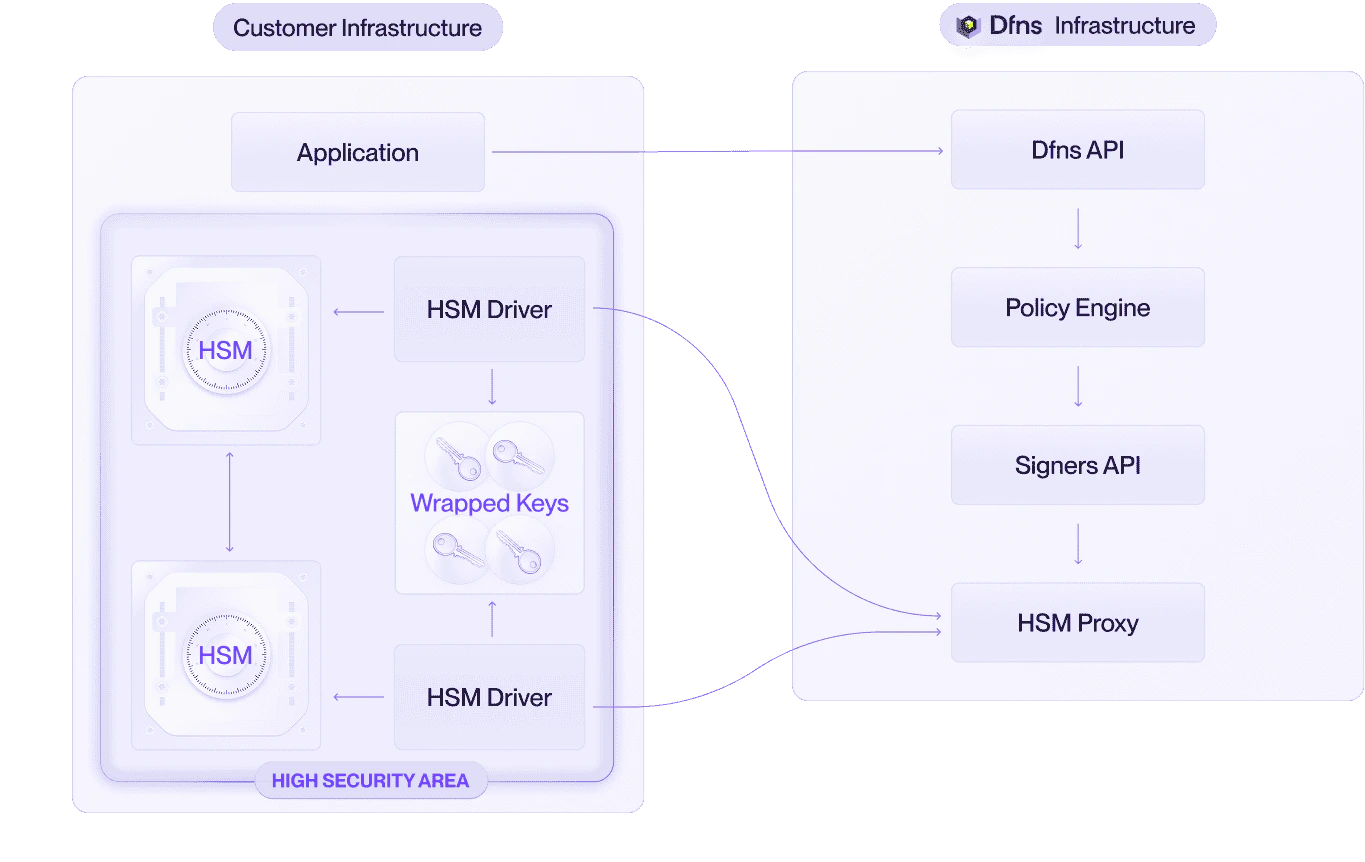
For production deployments, deploy at least two HSM Driver instances, each paired with an HSM (or connecting to an HSM cluster):
1. Ensure all HSMs share the same master key.
2. Ensure all HSM Drivers connect to the same database.
3. Generate a separate leaf mTLS certificate for each HSM Driver instance (signed by your intermediate certificate from step 4).
4. Start all HSM Driver instances. They will independently poll the DFNS API and automatically distribute the workload.
No load balancer or failover configuration is required. The queue-based pull model handles distribution and fault tolerance natively.
 ## Responsibility matrix (RACI)
* **R** = Responsible (does the work)
* **A** = Accountable (owns the outcome)
* **C** = Consulted (provides input)
* **I** = Informed (kept up to date)
| Activity | Customer | DFNS |
| ---------------------------------------------- | :------: | :--: |
| HSM procurement | R/A | I |
| HSM hardware installation and racking | R/A | — |
| HSM initialization and configuration | R/A | C |
| HSM master key generation and management | R/A | — |
| HSM master key backup and replication | R/A | — |
| HSM firmware updates and maintenance | R/A | — |
| HSM monitoring and health checks | R/A | — |
| Host server provisioning | R/A | C |
| HSM vendor client library installation | R/A | C |
| Database provisioning and management | R/A | — |
| Database backup and disaster recovery | R/A | — |
| HSM Driver software delivery | I | R/A |
| mTLS CSR template | I | R/A |
| Intermediate certificate key generation | R/A | — |
| Intermediate certificate signing | I | R/A |
| Leaf certificate generation (per Driver) | R/A | — |
| HSM Driver deployment and configuration | R/A | C |
| HSM Driver software updates | R | A |
| DFNS API availability and maintenance | — | R/A |
| Network connectivity (host to HSM) | R/A | — |
| Network connectivity (host to internet) | R/A | — |
| End-to-end integration testing | R | C |
| Ongoing HSM administration | R/A | — |
| Incident response (HSM / host / network) | R/A | C |
| Incident response (DFNS API / HSM Driver bugs) | C | R/A |
**Key takeaway**: DFNS provides the HSM Driver software, signs the intermediate mTLS certificate, and maintains the API. Everything else is your responsibility.
## Backup and disaster recovery
For a complete overview of what to back up and recovery scenarios, see the [disaster recovery](/advanced/deployment-models/disaster-recovery) page.
Key takeaways:
* **HSM master key** is the most critical asset. Loss is unrecoverable.
* **Wrapped-key database** should be backed up regularly. Wallets created after the last backup are lost if the database fails.
* **mTLS intermediate certificate private key** is especially critical. Without it, you cannot generate new leaf certificates for additional or replacement HSM Drivers.
## Security considerations
* **mTLS authentication**: All communication between the HSM Driver and DFNS APIs is encrypted and mutually authenticated. Only HSM Drivers with valid leaf certificates (chained to the DFNS-signed intermediate) can connect.
* **Wrapped key encryption**: Private keys stored in the database are encrypted with the HSM's master key. They are unusable without access to an HSM holding that master key.
* **No DFNS access to keys**: DFNS never has access to the HSM, the master key, the wrapped keys, or the database. DFNS only sees public keys and signed payloads.
* **Stateless HSM usage**: Private keys exist in plaintext only inside the HSM during cryptographic operations, and are never persisted in the clear.
* **Customer-controlled infrastructure**: You retain full control over the HSM, host server, database, and network configuration.
## Contact
For questions about the HSM deployment model or to begin the integration process, contact our Support Team.
## Responsibility matrix (RACI)
* **R** = Responsible (does the work)
* **A** = Accountable (owns the outcome)
* **C** = Consulted (provides input)
* **I** = Informed (kept up to date)
| Activity | Customer | DFNS |
| ---------------------------------------------- | :------: | :--: |
| HSM procurement | R/A | I |
| HSM hardware installation and racking | R/A | — |
| HSM initialization and configuration | R/A | C |
| HSM master key generation and management | R/A | — |
| HSM master key backup and replication | R/A | — |
| HSM firmware updates and maintenance | R/A | — |
| HSM monitoring and health checks | R/A | — |
| Host server provisioning | R/A | C |
| HSM vendor client library installation | R/A | C |
| Database provisioning and management | R/A | — |
| Database backup and disaster recovery | R/A | — |
| HSM Driver software delivery | I | R/A |
| mTLS CSR template | I | R/A |
| Intermediate certificate key generation | R/A | — |
| Intermediate certificate signing | I | R/A |
| Leaf certificate generation (per Driver) | R/A | — |
| HSM Driver deployment and configuration | R/A | C |
| HSM Driver software updates | R | A |
| DFNS API availability and maintenance | — | R/A |
| Network connectivity (host to HSM) | R/A | — |
| Network connectivity (host to internet) | R/A | — |
| End-to-end integration testing | R | C |
| Ongoing HSM administration | R/A | — |
| Incident response (HSM / host / network) | R/A | C |
| Incident response (DFNS API / HSM Driver bugs) | C | R/A |
**Key takeaway**: DFNS provides the HSM Driver software, signs the intermediate mTLS certificate, and maintains the API. Everything else is your responsibility.
## Backup and disaster recovery
For a complete overview of what to back up and recovery scenarios, see the [disaster recovery](/advanced/deployment-models/disaster-recovery) page.
Key takeaways:
* **HSM master key** is the most critical asset. Loss is unrecoverable.
* **Wrapped-key database** should be backed up regularly. Wallets created after the last backup are lost if the database fails.
* **mTLS intermediate certificate private key** is especially critical. Without it, you cannot generate new leaf certificates for additional or replacement HSM Drivers.
## Security considerations
* **mTLS authentication**: All communication between the HSM Driver and DFNS APIs is encrypted and mutually authenticated. Only HSM Drivers with valid leaf certificates (chained to the DFNS-signed intermediate) can connect.
* **Wrapped key encryption**: Private keys stored in the database are encrypted with the HSM's master key. They are unusable without access to an HSM holding that master key.
* **No DFNS access to keys**: DFNS never has access to the HSM, the master key, the wrapped keys, or the database. DFNS only sees public keys and signed payloads.
* **Stateless HSM usage**: Private keys exist in plaintext only inside the HSM during cryptographic operations, and are never persisted in the clear.
* **Customer-controlled infrastructure**: You retain full control over the HSM, host server, database, and network configuration.
## Contact
For questions about the HSM deployment model or to begin the integration process, contact our Support Team.