> ## Documentation Index
> Fetch the complete documentation index at: https://docs.dfns.co/llms.txt
> Use this file to discover all available pages before exploring further.
# MPC signing infrastructure
> How DFNS uses Multi-Party Computation to secure wallet keys across cloud, hybrid, and self-hosted deployments without ever reconstructing the private key.
export const SupportLink = ({children}) => {
const url = "https://support.dfns.co";
return {children || url};
};
DFNS uses Multi-Party Computation (MPC) to split wallet private keys into multiple shares, distributed across independent signers. No single signer ever holds the complete private key. Signing requires a threshold of signers to collaborate in a cryptographic ceremony, producing a valid signature without reconstructing the key.
MPC is the default key management approach for all DFNS deployment models. The API, SDKs, policies, and features work identically regardless of where the signers run.
## Deployment options
You choose where the signers run. DFNS supports three configurations:
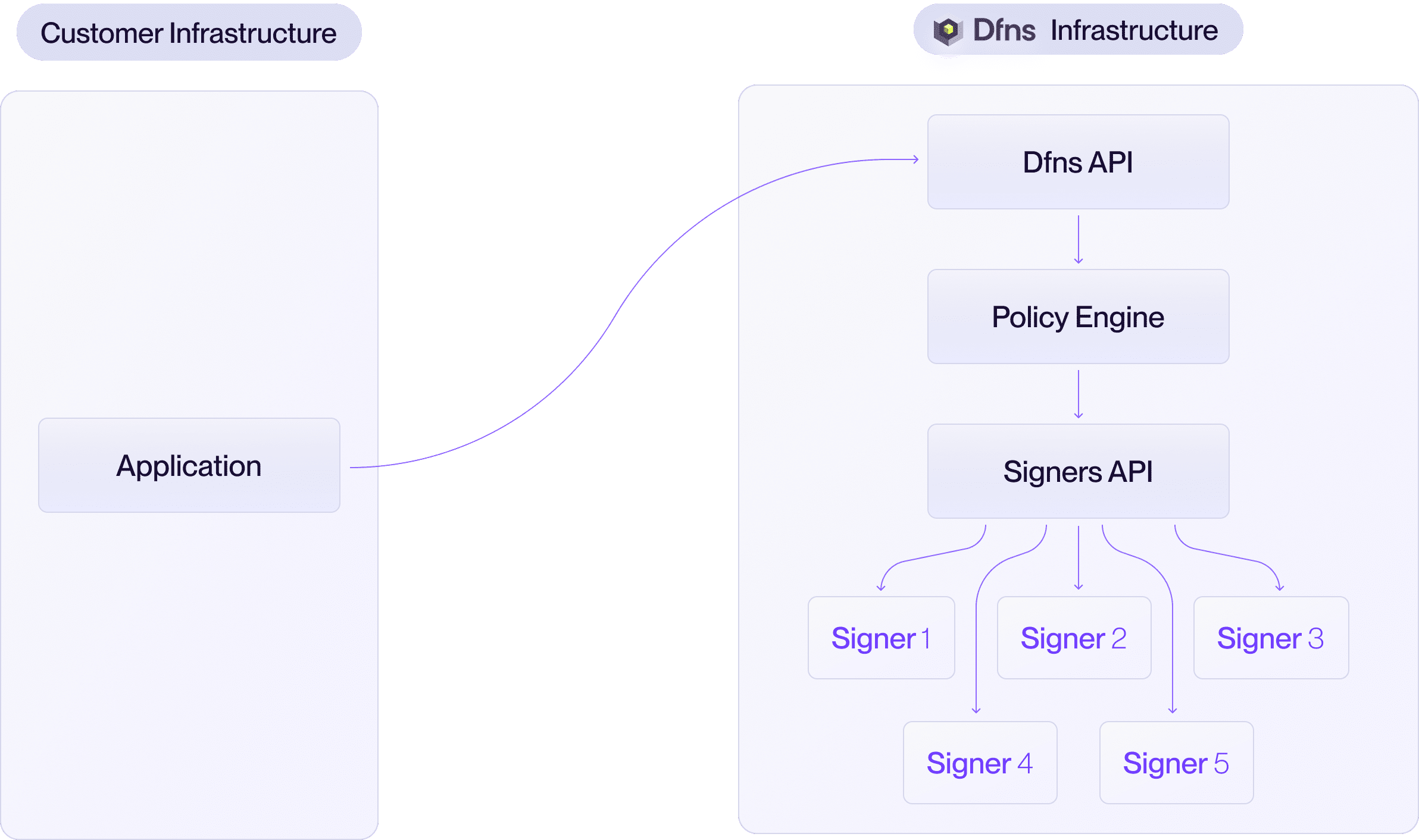
DFNS manages all signers in our geographically distributed cloud infrastructure. This is the default and most popular option.
* All key shares are secured and stored by DFNS.
* Zero operational overhead for your team.
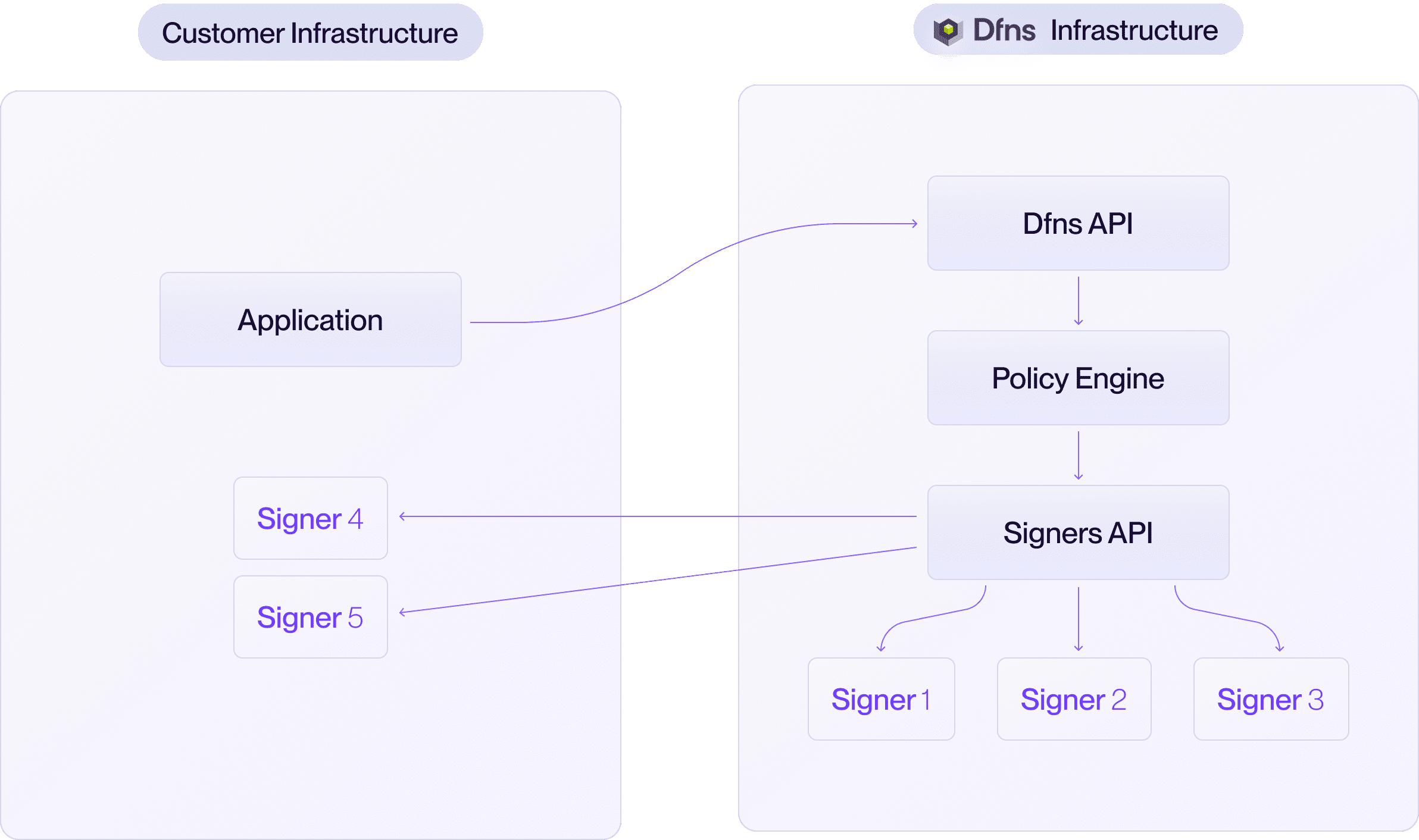
 DFNS manages some signers in our cloud, you operate the rest in your own infrastructure. This makes you a required participant in every signing ceremony, giving you a cryptographic veto over any transaction.
* You deploy and operate one or more DFNS signers on your infrastructure.
* You choose the threshold split between DFNS and your organization.
DFNS manages some signers in our cloud, you operate the rest in your own infrastructure. This makes you a required participant in every signing ceremony, giving you a cryptographic veto over any transaction.
* You deploy and operate one or more DFNS signers on your infrastructure.
* You choose the threshold split between DFNS and your organization.
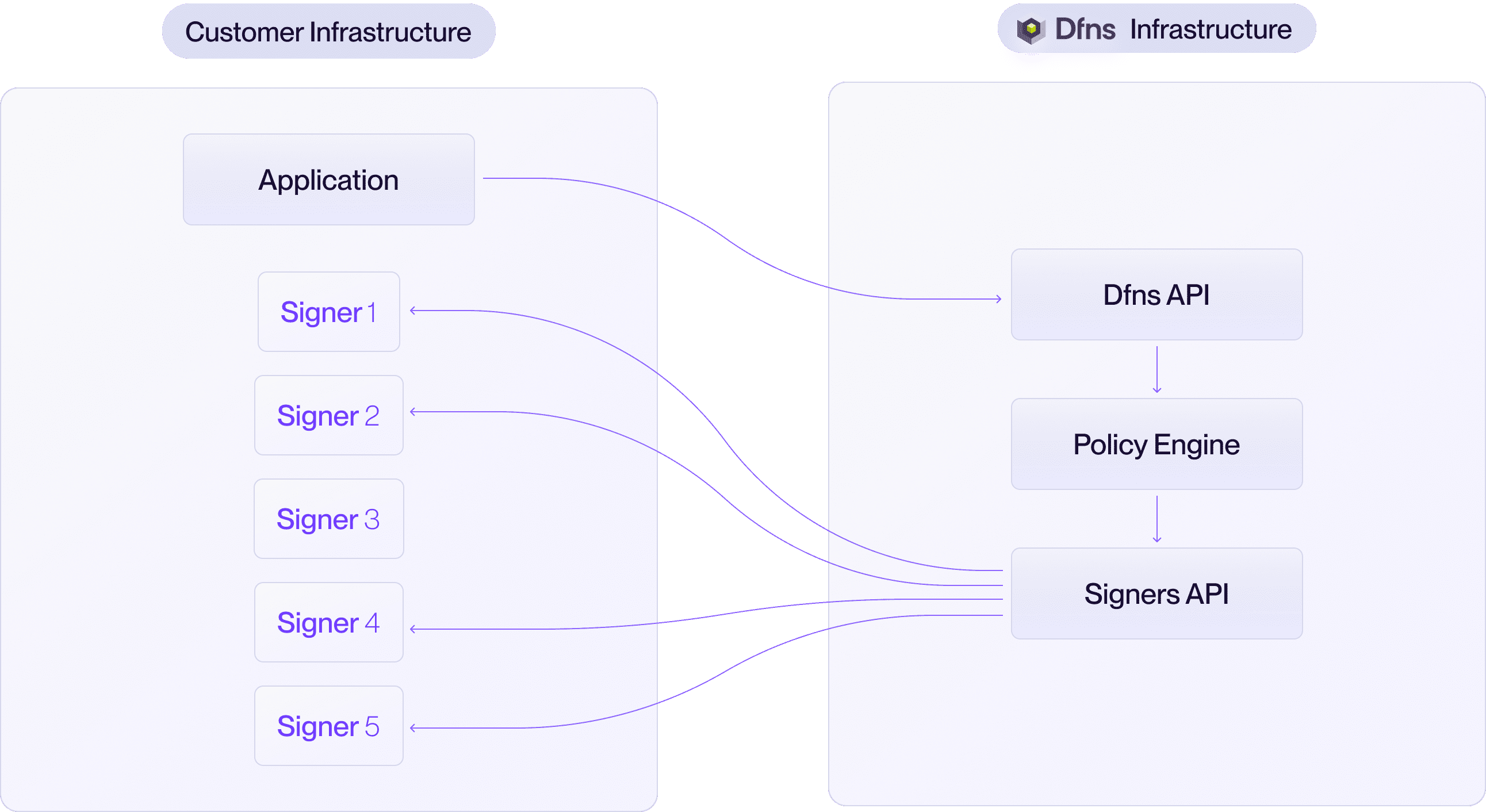
 You run all signers within your own data centers or private cloud. DFNS provides the software and API coordination, but all key shares remain under your control.
* Maximum control over your keys and infrastructure.
* You are responsible for all signer operations.
You run all signers within your own data centers or private cloud. DFNS provides the software and API coordination, but all key shares remain under your control.
* Maximum control over your keys and infrastructure.
* You are responsible for all signer operations.
 You can choose your preferred MPC threshold scheme. We recommend 3-out-of-5, but any configuration can be implemented (e.g. 2-of-3, 4-of-7).
## Architecture
The signer network consists of the following components:
| Component | Description |
| ------------------- | -------------------------------------------------------------------------------------------------------------------------------------------------------------------------- |
| **Signers** | DFNS signer software instances that hold key shares and participate in MPC ceremonies (key generation and signing). Each signer runs as a container or standalone process. |
| **Delivery server** | Handles inter-signer communication during MPC ceremonies. In hybrid deployments, DFNS operates the delivery server. In full on-premise deployments, you host it. |
| **Database** | Stores encrypted key shares. Each signer has its own database instance, ensuring no signer can access another's key shares and avoiding a single point of failure. |
| **Encryption keys** | Keys used to encrypt and decrypt key shares at rest. When hosting signers on-premise, you manage these encryption keys. In the DFNS Cloud model, DFNS manages them. |
## Key generation
Distributed Key Generation (DKG) is the ceremony where signers collaboratively generate key shares without any single party ever holding the complete private key. All signers in the scheme must participate.
```mermaid theme={null}
sequenceDiagram
participant App as Your application
participant API as DFNS API
participant DS as Delivery Server
participant S as Each signer (×n)
participant DB as Database
App->>API: Create wallet or key
API->>S: DKG request
S->>DS: MPC protocol exchanges
DS-->>S: MPC protocol exchanges
S->>DB: Store encrypted key share
S-->>API: Public key
API-->>App: Wallet created
```
1. Your application requests a new wallet through the DFNS API.
2. The API initiates a DKG ceremony by contacting each participating signer.
3. Each signer generates its key share locally and communicates with other signers through the delivery server using mTLS.
4. Once the ceremony completes, each signer persists its encrypted key share in its database.
5. The public key is returned to your application.
## Transaction signing
Only the threshold number of signers need to participate in a signing ceremony.
```mermaid theme={null}
sequenceDiagram
participant App as Your application
participant API as DFNS API
participant DS as Delivery Server
participant S as Each signer (×t)
participant DB as Database
App->>API: Sign transaction
API->>S: Signing request + payload
S->>DB: Retrieve encrypted key share
DB-->>S: Encrypted key share
S->>DS: MPC signing protocol exchanges
DS-->>S: MPC signing protocol exchanges
S-->>API: Threshold signature
API-->>App: Transaction signed
```
1. Your application submits a transaction through the DFNS API.
2. The API initiates a signing ceremony with the required threshold of signers.
3. Each participating signer retrieves its encrypted key share, decrypts it, and participates in the MPC signing protocol via the delivery server.
4. The threshold signature is produced without any single signer holding the complete private key.
5. The signature is returned to your application.
## Threshold schemes
The threshold scheme (`t`-out-of-`n`) determines:
| Property | Effect |
| ------------------------ | ------------------------------------------------------------------ |
| **Signing availability** | Only `t` out of `n` signers need to be online to sign. |
| **Fault tolerance** | Up to `n - t` signers can be offline without affecting operations. |
| **Security** | An attacker must compromise `t` signers to reconstruct a key. |
In a hybrid deployment, you decide how many signers are operated by DFNS versus your organization. For example, in a 3-of-5 scheme, you could host 2 signers and DFNS hosts 3. Neither party alone can sign without the other's participation.
## Add-on features
When running signers on your own infrastructure, additional features are available:
* **[Validation gate](/advanced/deployment-models/validation-gate)**: Add a pre-signing authorization step where your HTTP handler approves or rejects every transaction before the signer proceeds.
* **[Layer 4 disaster recovery](/advanced/deployment-models/disaster-recovery#layer-4-disaster-recovery)**: Automatically encrypt key share backups with your own public key and store them in your S3 bucket for independent recovery.
## Deploying signers on your infrastructure
If you choose the hybrid or on-premise model, you will deploy and operate DFNS signers in your environment. For the complete implementation guide, including prerequisites, mTLS certificate setup, signer configuration, and operational procedures, contact our Support Team.
Self-hosted signers support several key isolation and keystore configurations depending on your security and operational requirements. The available options are not all covered in the public documentation. Contact our Support Team to discuss which setup fits your deployment.
You can choose your preferred MPC threshold scheme. We recommend 3-out-of-5, but any configuration can be implemented (e.g. 2-of-3, 4-of-7).
## Architecture
The signer network consists of the following components:
| Component | Description |
| ------------------- | -------------------------------------------------------------------------------------------------------------------------------------------------------------------------- |
| **Signers** | DFNS signer software instances that hold key shares and participate in MPC ceremonies (key generation and signing). Each signer runs as a container or standalone process. |
| **Delivery server** | Handles inter-signer communication during MPC ceremonies. In hybrid deployments, DFNS operates the delivery server. In full on-premise deployments, you host it. |
| **Database** | Stores encrypted key shares. Each signer has its own database instance, ensuring no signer can access another's key shares and avoiding a single point of failure. |
| **Encryption keys** | Keys used to encrypt and decrypt key shares at rest. When hosting signers on-premise, you manage these encryption keys. In the DFNS Cloud model, DFNS manages them. |
## Key generation
Distributed Key Generation (DKG) is the ceremony where signers collaboratively generate key shares without any single party ever holding the complete private key. All signers in the scheme must participate.
```mermaid theme={null}
sequenceDiagram
participant App as Your application
participant API as DFNS API
participant DS as Delivery Server
participant S as Each signer (×n)
participant DB as Database
App->>API: Create wallet or key
API->>S: DKG request
S->>DS: MPC protocol exchanges
DS-->>S: MPC protocol exchanges
S->>DB: Store encrypted key share
S-->>API: Public key
API-->>App: Wallet created
```
1. Your application requests a new wallet through the DFNS API.
2. The API initiates a DKG ceremony by contacting each participating signer.
3. Each signer generates its key share locally and communicates with other signers through the delivery server using mTLS.
4. Once the ceremony completes, each signer persists its encrypted key share in its database.
5. The public key is returned to your application.
## Transaction signing
Only the threshold number of signers need to participate in a signing ceremony.
```mermaid theme={null}
sequenceDiagram
participant App as Your application
participant API as DFNS API
participant DS as Delivery Server
participant S as Each signer (×t)
participant DB as Database
App->>API: Sign transaction
API->>S: Signing request + payload
S->>DB: Retrieve encrypted key share
DB-->>S: Encrypted key share
S->>DS: MPC signing protocol exchanges
DS-->>S: MPC signing protocol exchanges
S-->>API: Threshold signature
API-->>App: Transaction signed
```
1. Your application submits a transaction through the DFNS API.
2. The API initiates a signing ceremony with the required threshold of signers.
3. Each participating signer retrieves its encrypted key share, decrypts it, and participates in the MPC signing protocol via the delivery server.
4. The threshold signature is produced without any single signer holding the complete private key.
5. The signature is returned to your application.
## Threshold schemes
The threshold scheme (`t`-out-of-`n`) determines:
| Property | Effect |
| ------------------------ | ------------------------------------------------------------------ |
| **Signing availability** | Only `t` out of `n` signers need to be online to sign. |
| **Fault tolerance** | Up to `n - t` signers can be offline without affecting operations. |
| **Security** | An attacker must compromise `t` signers to reconstruct a key. |
In a hybrid deployment, you decide how many signers are operated by DFNS versus your organization. For example, in a 3-of-5 scheme, you could host 2 signers and DFNS hosts 3. Neither party alone can sign without the other's participation.
## Add-on features
When running signers on your own infrastructure, additional features are available:
* **[Validation gate](/advanced/deployment-models/validation-gate)**: Add a pre-signing authorization step where your HTTP handler approves or rejects every transaction before the signer proceeds.
* **[Layer 4 disaster recovery](/advanced/deployment-models/disaster-recovery#layer-4-disaster-recovery)**: Automatically encrypt key share backups with your own public key and store them in your S3 bucket for independent recovery.
## Deploying signers on your infrastructure
If you choose the hybrid or on-premise model, you will deploy and operate DFNS signers in your environment. For the complete implementation guide, including prerequisites, mTLS certificate setup, signer configuration, and operational procedures, contact our Support Team.
Self-hosted signers support several key isolation and keystore configurations depending on your security and operational requirements. The available options are not all covered in the public documentation. Contact our Support Team to discuss which setup fits your deployment.