> ## Documentation Index
> Fetch the complete documentation index at: https://docs.dfns.co/llms.txt
> Use this file to discover all available pages before exploring further.
# Fee Sponsors
> Sponsor gas fees for your wallets so end users can transact without holding native tokens, with policy-controlled sponsor wallets and limits.
export const Youtube = props => {
return ;
};
Typically submitting transactions to a blockchain requires the sender to pay a small amount of fees called gas fees. These fees compensate network participants, such as miners or validators, for the computational resources needed to execute transactions, smart contracts, and other operations. What it means in practice is that for users to transfer some stable coins such as `USDC`, they must also hold a small amount of the native tokens of the blockchains used to pay the gas fees. This creates friction because you must constantly top up all your wallets in order for them to stay functional.
The Fee Sponsor enables you to sponsor gasless transactions for your wallets via the [Transfer API](/api-reference/wallets/transfer-asset). This allows you to manage a small set of fee sponsor wallets with native tokens and use them to pay gas fees for other wallets.
To sponsor a transfer,
* [Designate](/api-reference/fee-sponsors/create-fee-sponsor) a DFNS wallet as the fee sponsor. See below for supported networks.
* Fund the fee sponsor wallet with some native tokens.
* Specify the `feeSponsorId` when [creating a transfer request](/api-reference/wallets/transfer-asset). Note that the sponsor and sponsoree wallets must be for the same network.
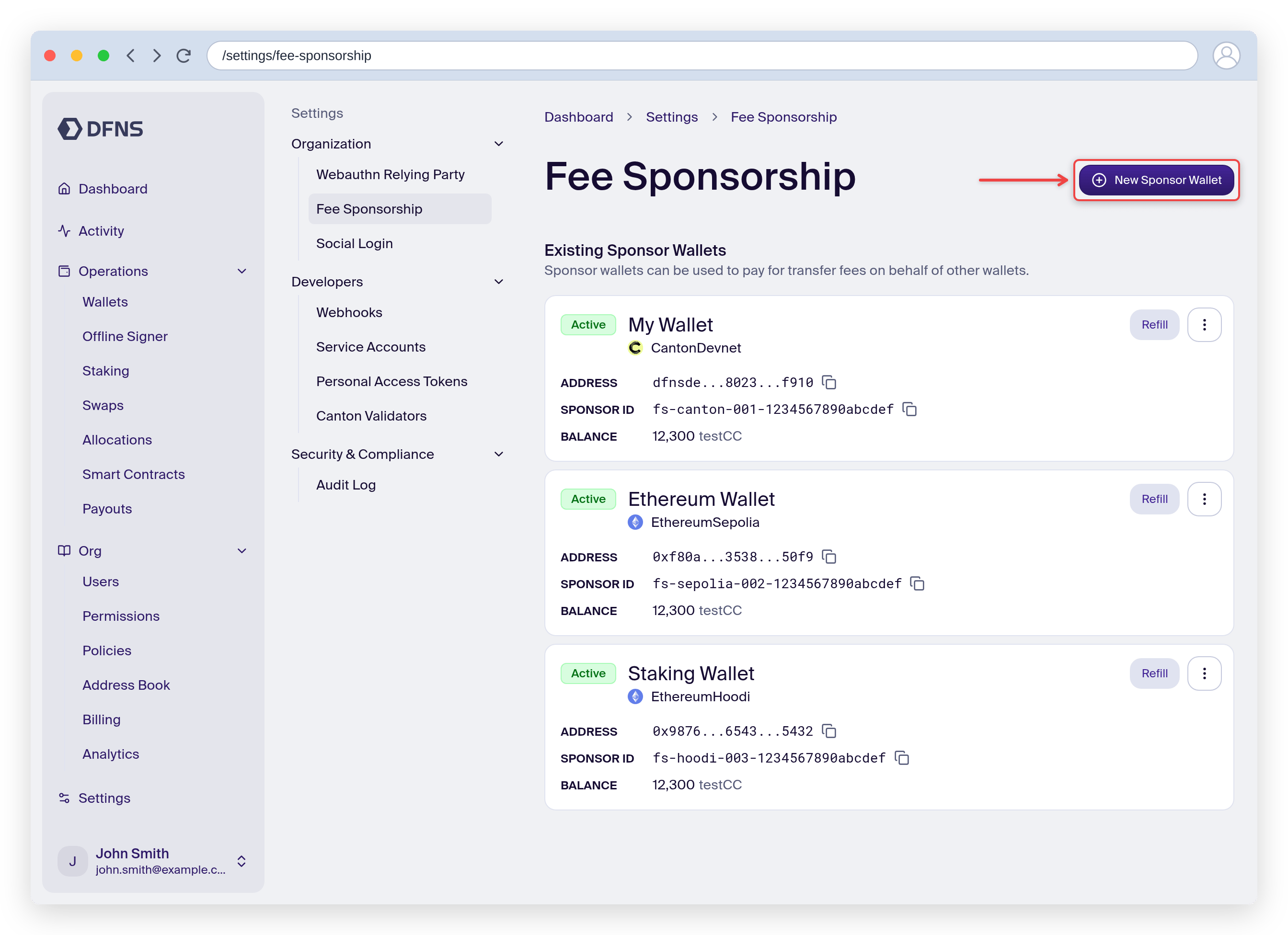
**Finding your fee sponsor ID:** `feeSponsorId` is the ID of the fee sponsor entity (format `fs-...`), not the sponsor wallet's ID or address. It is returned when you [create a fee sponsor](/api-reference/fee-sponsors/create-fee-sponsor), and you can look it up later via [List Fee Sponsors](/api-reference/fee-sponsors/list-fee-sponsors) / [Get Fee Sponsor](/api-reference/fee-sponsors/get-fee-sponsor), or in the dashboard under **Settings → Fee Sponsorship** (each sponsor shows a **Sponsor ID** you can copy). Passing a wallet address or wallet ID is rejected.
**High-volume tip:** If you're processing a high volume of transactions for a given wallet, use a single fee sponsor for that wallet. This allows DFNS to better optimize transaction scheduling and improve throughput.
## Funding the sponsor wallet
There is no fixed minimum balance. A fee sponsor pays gas out of its own native balance, so fund it with the native token of its network (for example ETH on Ethereum, SOL on Solana, XLM on Stellar) in proportion to the volume and cost of the transfers you expect it to cover.
* Size the balance to roughly `expected sponsored transactions × typical gas cost per transaction` for your busiest period, plus headroom for gas-price spikes.
* Monitor the sponsor wallet's balance and top it up before it runs low. If the sponsor cannot cover the fee, the sponsored transfer fails.
* Use [Estimate Fees](/api-reference/networks/estimate-fees) to gauge current per-transaction cost on the target network.
The sponsor wallet balance is shown under **Settings → Fee Sponsorship** in the dashboard, alongside each sponsor's network and **Sponsor ID**.
## From the dashboard
You can manage fee sponsors without the API, under **Settings → Fee Sponsorship**.
Existing sponsor wallets are listed with their network, balance, and **Sponsor ID**. Click **New Sponsor Wallet** to add one.
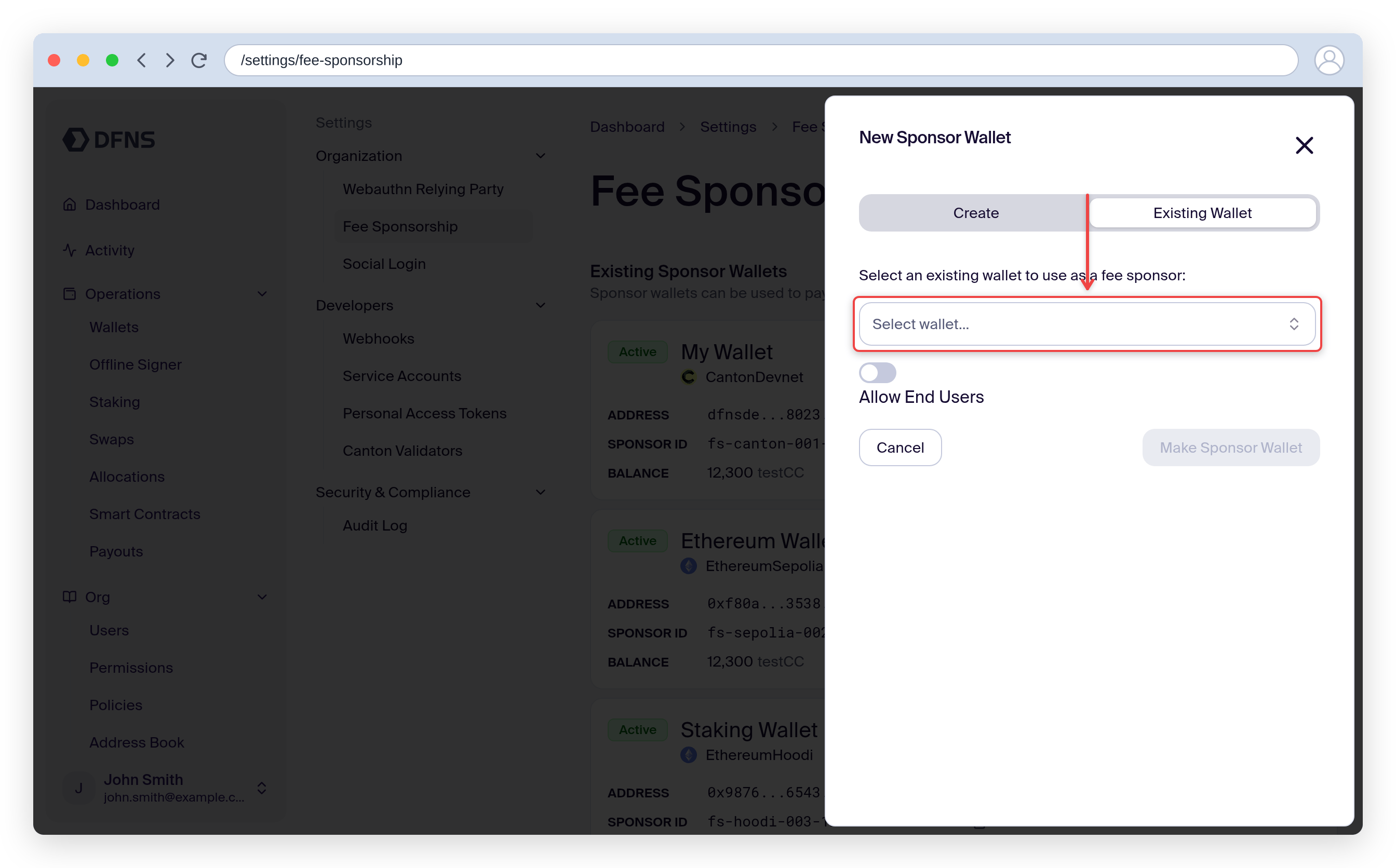
Create a new wallet to sponsor with, or pick an existing wallet from the **Existing Wallet** tab. Fund it with native tokens, then reference its **Sponsor ID** (`fs-...`) when creating transfers.
## End user access
By default, only [service accounts](/guides/developers/service-account) and organization users (`CustomerEmployee`) can use a fee sponsor when creating transfers. If you want your end users (`EndUser`) to use a fee sponsor when making transfers from their delegated wallets, set `allowEndUser: true` when [creating the fee sponsor](/api-reference/fee-sponsors/create-fee-sponsor).
```typescript theme={null}
const feeSponsor = await dfns.feeSponsors.createFeeSponsor({
body: {
walletId: 'wa-...',
allowEndUser: true, // Allow EndUsers to use this fee sponsor
},
})
```
If you don't set `allowEndUser: true` and an EndUser tries to use the fee sponsor, they will receive a `401 Unauthorized` error.
The sponsoree wallet (the wallet being sponsored) must be an org-managed or delegated wallet in DFNS. External wallets cannot be sponsored.
A wallet that is registered as a fee sponsor cannot itself be sponsored. To move funds out of a fee sponsor wallet, send the transfer without a `feeSponsorId` so the wallet pays its own gas from its native balance.
**Policy consideration:** When using fee sponsorship, the fee sponsor wallet must sign a transaction to pay the gas fees. If the fee sponsor wallet has a [policy](/core-concepts/policies) that blocks or requires approval for signing (e.g., a `Block` action on `Wallets:Sign`), the sponsored transfer will fail. Ensure your fee sponsor wallet is not subject to any blocking policies.
## Supported networks
Not all networks support this feature. You can create fee sponsors for the following supported networks.
| Mainnets | Testnets |
| :----------------- | :--------------------------------- |
| `ArbitrumOne` [^1] | `ArbitrumSepolia` |
| `Base` [^1] | `BaseSepolia` |
| `Berachain` [^1] | `BerachainBepolia` |
| `Bsc` [^1] | `BscTestnet` |
| `Ethereum` [^1] | `EthereumHoodi`, `EthereumSepolia` |
| `FlowEvm` [^1] | `FlowEvmTestnet` |
| `Optimism` [^1] | `OptimismSepolia` |
| `Plasma` [^1] | `PlasmaTestnet` |
| `Polygon` [^1] | `PolygonAmoy` |
| `Solana` | `SolanaDevnet` |
| `Stellar` | `StellarTestnet` |
[^1]: The implementation leverages [EIP-7702](https://eips.ethereum.org/EIPS/eip-7702) that turns your EOA into a smart contract account. When you use this feature, the on chain account of the sponsoree wallet will become a smart contract. You can view the source code of the smart contract we use [here](https://github.com/dfns/dfns-smart-account).
Not all networks support fee sponsorship. For TRON, you can achieve a similar result using [native resource delegation](/networks/tron#fee-sponsorship).
## Getting Started
***