> ## Documentation Index
> Fetch the complete documentation index at: https://docs.dfns.co/llms.txt
> Use this file to discover all available pages before exploring further.
# Create a service account
> How to create a DFNS service account, assign it permissions, and use its signing key for server-to-server API access without a human user.
export const Youtube = props => {
return ;
};
Service accounts are machine users for server-to-server communication. Unlike human users who authenticate with passkeys, service accounts use a keypair to sign API requests.
## When to use a service account
Use a service account when you need to:
* Call the DFNS API from your backend server
* Run automated processes (scheduled transfers, batch operations)
* Build applications that create wallets or manage users on behalf of your organization
## Create the service account
Your service account needs a keypair to sign its API requests. Generate one using OpenSSL:
```bash theme={null}
# Generate the private key
openssl genrsa -out service-account.pem 2048
# Extract the public key
openssl pkey -in service-account.pem -pubout -out service-account.public.pem
```
Keep the private key (`service-account.pem`) secure - you'll need it to sign requests.
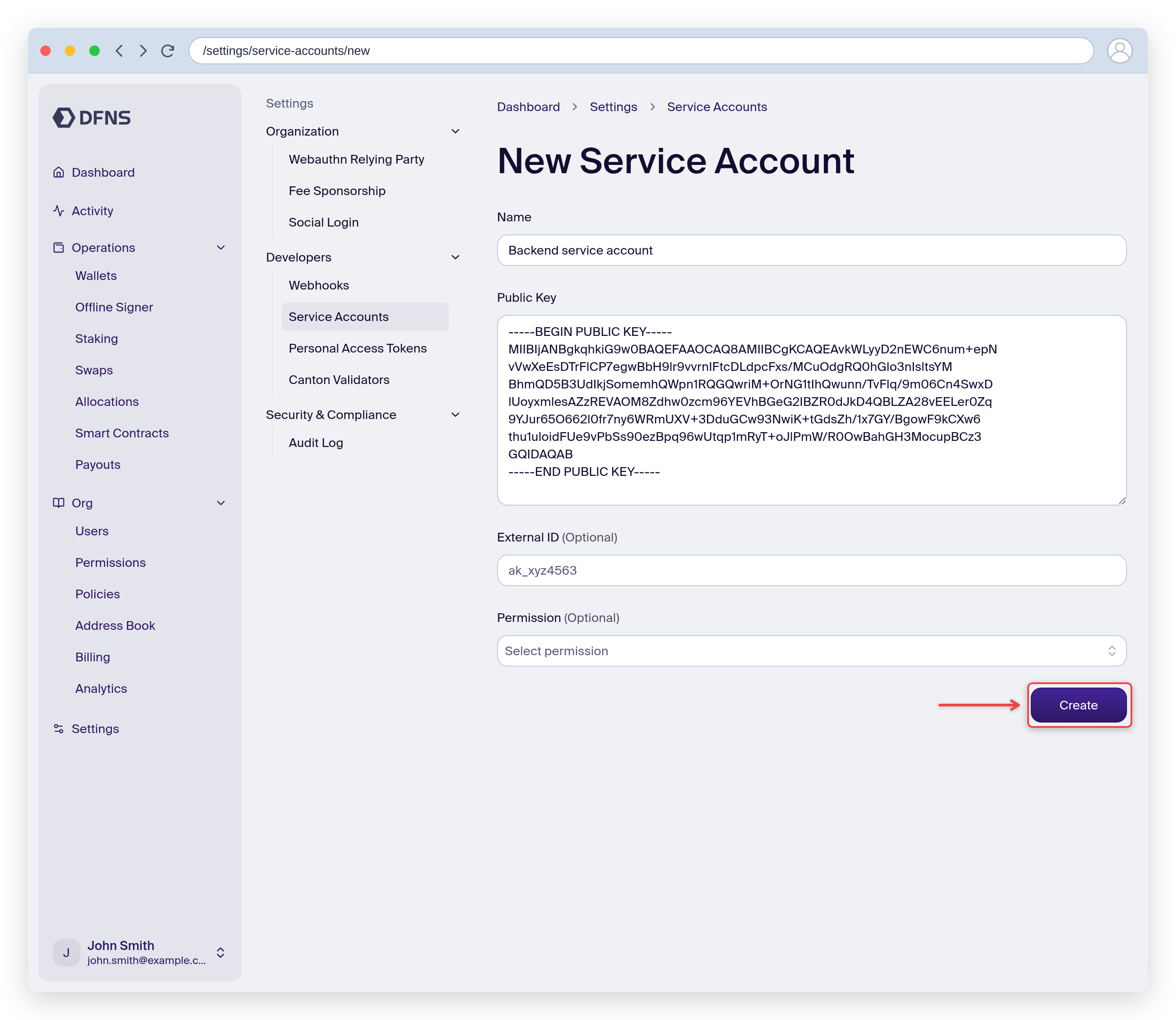
1. Navigate to **Settings > Developers > Service Accounts** (direct link: [https://app.dfns.io/settings/service-accounts](https://app.dfns.io/settings/service-accounts))
2. Click **New Service Account**
3. Enter a name (e.g., "Backend Server" or "Trading Bot")
4. Paste the contents of your public key file (including the `-----BEGIN PUBLIC KEY-----` and `-----END PUBLIC KEY-----` lines)
5. Click **Create** and 🔑 sign with your passkey
The public key field also accepts an **OpenSSH-format** public key (`ssh-ed25519 AAAA...`, `ssh-rsa AAAA...`, or `ecdsa-sha2-nistp256/384/521 ...` — the contents of a `.pub` file), in addition to the PEM/SPKI `-----BEGIN PUBLIC KEY-----` block. OpenSSH input is converted to PEM for you before the service account is created.
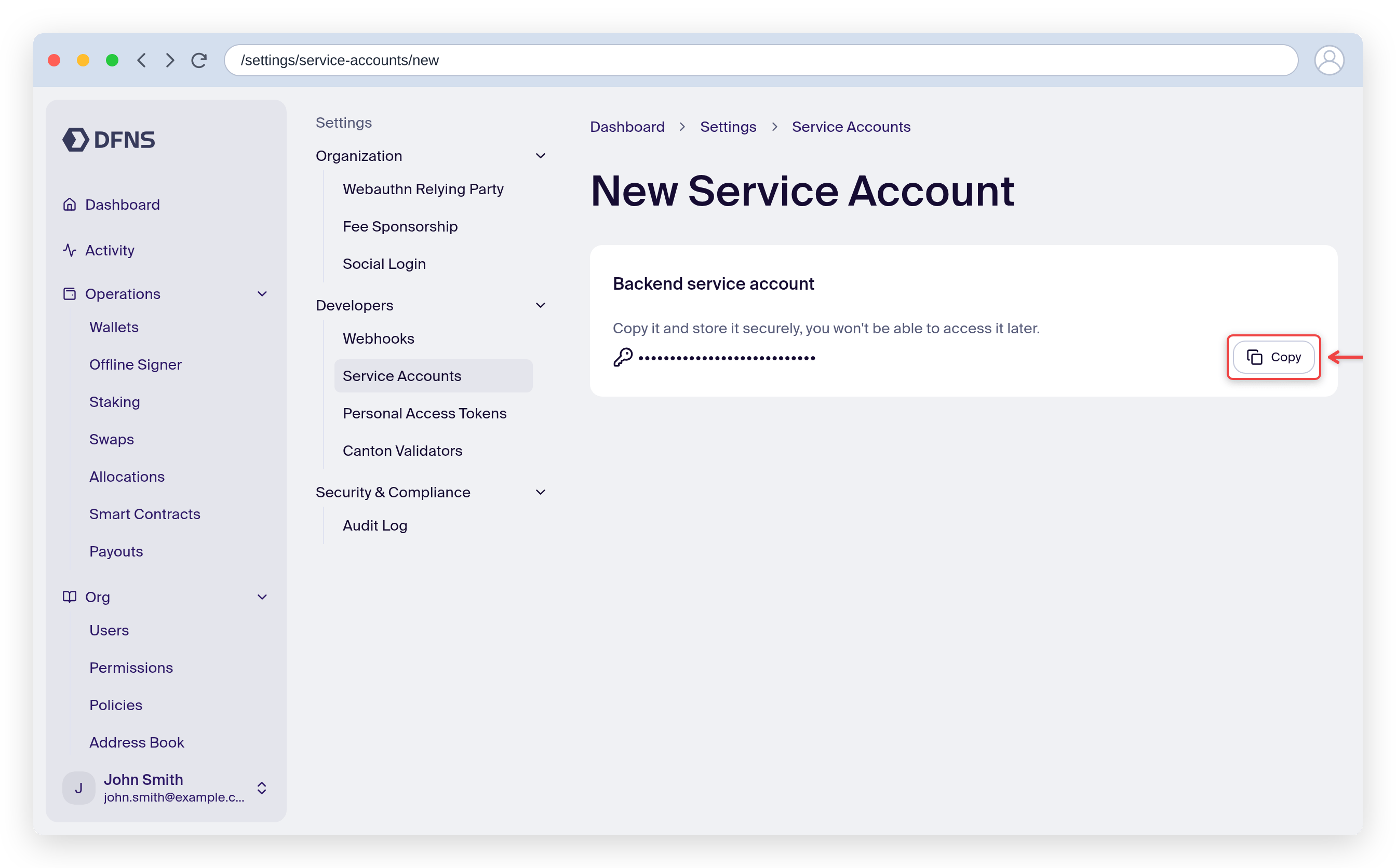
After creation, you'll see the service account token. **Copy it immediately** - it won't be shown again.
If you lose the token, you'll need to create a new service account.
Store both the token and private key securely. DFNS recommends using a secrets manager like AWS Secrets Manager, HashiCorp Vault, or your cloud provider's equivalent.
Service account tokens are valid for **2 years** by default, which is also the maximum. To set a shorter lifetime, pass `daysValid` (or `secondsValid`) when creating the service account via the [API](/api-reference/auth/create-service-account); the dashboard always uses the default. When a token expires, requests fail with a `401`, and you need to [rotate the credential](/guides/developers/credential-rotation).
By default, a new service account has **no permissions**. You must explicitly assign a role with the permissions it needs:
1. Navigate to **Settings > Roles** and create a new role with only the required permissions
2. Go back to **Settings > Developers > Service Accounts** and click on your service account
3. Assign the dedicated role
**Common permission sets:**
| Use case | Permissions needed |
| ------------------------- | ------------------------------------------------------------------ |
| Create and manage wallets | `Wallets:Create`, `Wallets:Read` |
| Transfer assets | `Wallets:Read`, `Wallets:Sign` |
| Register end users | `Auth:Users:Create`, `Auth:Users:Read` |
| Full wallet management | `Wallets:Create`, `Wallets:Read`, `Wallets:Sign`, `Wallets:Update` |
See the [full list of permissions](/core-concepts/roles-and-permissions#list-of-permissions) for all available options.
You can also assign a permission at creation time by passing a `permissionId` in the [Create Service Account](/api-reference/auth/create-service-account) API request body. The creating user must have the `PermissionsAssign` permission.
## Service account limitations
Service accounts can perform most operations, but some actions require human interaction:
| Operation | Service Account | Notes |
| ----------------------------- | --------------- | ------------------------------------------------------------------------------- |
| Create wallets | Yes | |
| Transfer assets | Yes | Subject to policies |
| Sign transactions | Yes | Subject to policies |
| Create end users | Yes | For delegated wallets |
| Approve policy requests | Opt-in | Requires `serviceAccountsCanApprove` on the approval group and staff activation |
| Create policies | Yes | |
| Create other service accounts | No | Requires human passkey |
| Modify policies | Yes | But approval may require humans |
Service accounts can participate in [policy approvals](/core-concepts/policies#service-account-approvers) when explicitly enabled on the approval group. This feature requires activation by DFNS staff on your organization.
## Using your service account
You now have everything needed to make API calls:
| Credential | Purpose |
| --------------- | ----------------------------------------------------------------------------------------------------- |
| **Token** | Used in the `Authorization: Bearer ` header |
| **Private key** | Used to sign [user action challenges](/api-reference/auth/signing-flows) for POST/PUT/DELETE requests |
See the [TypeScript SDK service account example](https://github.com/dfns/dfns-sdk-ts/tree/m/examples/sdk/service-account) for a complete implementation.
## Related
How to sign API requests with your service account
Full list of available permissions