> ## Documentation Index
> Fetch the complete documentation index at: https://docs.dfns.co/llms.txt
> Use this file to discover all available pages before exploring further.
# Connect AI tools to DFNS docs
> Give your AI coding assistants direct access to the DFNS documentation and llms.txt for accurate, up-to-date code generation and answers.
Tools like Claude, Cursor, and VS Code Copilot can query DFNS docs in real time, giving you accurate answers about APIs, authentication flows, and blockchain integrations instead of relying on stale training data.
## One-click setup
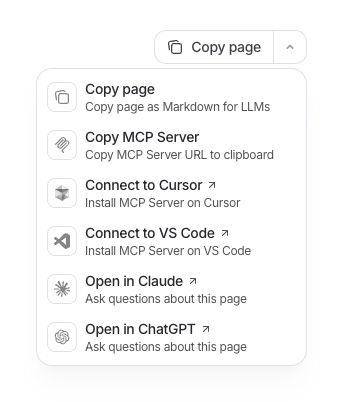
Use the contextual menu on any page to instantly connect your AI tools to DFNS documentation.
 ## Manual setup
1. Open [Claude Settings → Connectors](https://claude.ai/settings/connectors)
2. Click **Add custom connector**
3. Enter name `DFNS` and URL `https://docs.dfns.co/mcp`
4. When chatting, click the attachment icon and select DFNS to enable doc search
```bash theme={null}
claude mcp add --transport http DFNS https://docs.dfns.co/mcp
```
1. Open command palette: `Cmd+Shift+P` (Mac) or `Ctrl+Shift+P` (Windows)
2. Search **Open MCP settings** → **Add custom MCP**
3. Add to `mcp.json`:
```json theme={null}
{
"mcpServers": {
"DFNS": {
"url": "https://docs.dfns.co/mcp"
}
}
}
```
1. Open command palette: `Cmd+Shift+P` (Mac) or `Ctrl+Shift+P` (Windows)
2. Run **MCP: Add Server** and select **Workspace** (project-specific) or **User** (global)
3. Add the following configuration:
```json theme={null}
{
"servers": {
"DFNS": {
"type": "http",
"url": "https://docs.dfns.co/mcp"
}
}
}
```
See [VS Code MCP documentation](https://code.visualstudio.com/docs/copilot/customization/mcp-servers) for more options.
## How it works
DFNS documentation is exposed through the [Model Context Protocol (MCP)](https://modelcontextprotocol.io/), an open standard that lets AI tools search and retrieve documentation content.
When you connect an AI tool to our MCP server `https://docs.dfns.co/mcp`, it gains the ability to:
* Search across all DFNS documentation
* Retrieve relevant pages based on your questions
* Access the latest content (not stale training data)
The AI decides when to search based on conversation context. Ask about creating wallets, signing transactions, or configuring policies, and it will automatically pull the relevant documentation.
## Bulk access for custom integrations
Building your own AI tooling or RAG pipeline? Access the full documentation programmatically:
| Resource | Description |
| ---------------------------------------------------- | --------------------------------------- |
| [/llms.txt](https://docs.dfns.co/llms.txt) | Index of all pages with descriptions |
| [/llms-full.txt](https://docs.dfns.co/llms-full.txt) | Complete documentation as a single file |
Any page is also available as Markdown by adding `.md` to its URL (e.g., [/api-reference.md](https://docs.dfns.co/api-reference.md)).
## Manual setup
1. Open [Claude Settings → Connectors](https://claude.ai/settings/connectors)
2. Click **Add custom connector**
3. Enter name `DFNS` and URL `https://docs.dfns.co/mcp`
4. When chatting, click the attachment icon and select DFNS to enable doc search
```bash theme={null}
claude mcp add --transport http DFNS https://docs.dfns.co/mcp
```
1. Open command palette: `Cmd+Shift+P` (Mac) or `Ctrl+Shift+P` (Windows)
2. Search **Open MCP settings** → **Add custom MCP**
3. Add to `mcp.json`:
```json theme={null}
{
"mcpServers": {
"DFNS": {
"url": "https://docs.dfns.co/mcp"
}
}
}
```
1. Open command palette: `Cmd+Shift+P` (Mac) or `Ctrl+Shift+P` (Windows)
2. Run **MCP: Add Server** and select **Workspace** (project-specific) or **User** (global)
3. Add the following configuration:
```json theme={null}
{
"servers": {
"DFNS": {
"type": "http",
"url": "https://docs.dfns.co/mcp"
}
}
}
```
See [VS Code MCP documentation](https://code.visualstudio.com/docs/copilot/customization/mcp-servers) for more options.
## How it works
DFNS documentation is exposed through the [Model Context Protocol (MCP)](https://modelcontextprotocol.io/), an open standard that lets AI tools search and retrieve documentation content.
When you connect an AI tool to our MCP server `https://docs.dfns.co/mcp`, it gains the ability to:
* Search across all DFNS documentation
* Retrieve relevant pages based on your questions
* Access the latest content (not stale training data)
The AI decides when to search based on conversation context. Ask about creating wallets, signing transactions, or configuring policies, and it will automatically pull the relevant documentation.
## Bulk access for custom integrations
Building your own AI tooling or RAG pipeline? Access the full documentation programmatically:
| Resource | Description |
| ---------------------------------------------------- | --------------------------------------- |
| [/llms.txt](https://docs.dfns.co/llms.txt) | Index of all pages with descriptions |
| [/llms-full.txt](https://docs.dfns.co/llms-full.txt) | Complete documentation as a single file |
Any page is also available as Markdown by adding `.md` to its URL (e.g., [/api-reference.md](https://docs.dfns.co/api-reference.md)).