> ## Documentation Index
> Fetch the complete documentation index at: https://docs.dfns.co/llms.txt
> Use this file to discover all available pages before exploring further.
# Freeze a wallet
> How to block all outgoing transactions from a DFNS wallet using policies and tags, including temporary freezes and granular allowlists.
You can freeze a wallet, blocking all outgoing transactions, by combining a policy with wallet tags. This allows you to immediately block transactions in case of a security incident, suspected compromise, or compliance hold, and unblock the wallet when the situation is resolved.
Only outgoing transactions can be blocked. Incoming transactions are on-chain and cannot be prevented by DFNS.
Policies only apply to organization-managed wallets. [Delegated wallets](/advanced/delegated-wallets) bypass the policy engine entirely. Those wallets should be frozen by other means, such as by revoking credentials or permissions in the external system that manages them.
This pattern applies to wallets only. [Vaults](/core-concepts/vaults-wallets-and-keys#vaults-managed-custody-on-top-of-wallets) have no policy activity to block — their underlying wallets are sealed and funds move only through the vault transfer API. To stop outflows from a vault, revoke the `Vaults:Transfers:Create` permission from the acting user or service account.
## How it works
1. Create a policy that blocks all transactions from wallets tagged `frozen`
2. To freeze a wallet, add the `frozen` tag to it
3. To unfreeze, remove the tag
The policy stays in place permanently. You control which wallets are frozen by managing tags, not by editing policies.
## Set up the freeze policy
Create a policy with the `AlwaysTrigger` rule and `Block` action, filtered to the `frozen` tag. This policy only needs to be created once. Any wallet tagged `frozen` will have all outgoing transactions blocked.
### From the dashboard
Navigate to **Policies** and click **Create Policy**.
Enter a name like `Freeze Tagged Wallets` and click **Continue**.
Select **Wallet usage (transfer, transaction, signature)** and click **Continue**.
Under **Any Tags**, click **Add Tags** and add the `frozen` tag. Click **Continue**.
Select **Always trigger**.
Select **Block**.
Review the summary and click **Save**.
### With APIs
```typescript TypeScript theme={null}
const policy = await dfns.policies.createPolicy({
body: {
name: 'Freeze Tagged Wallets',
activityKind: 'Wallets:Sign',
rule: {
kind: 'AlwaysTrigger',
configuration: {},
},
action: {
kind: 'Block',
},
filters: {
walletTags: {
hasAny: ['frozen'],
},
},
status: 'Active',
},
})
```
```python Python theme={null}
policy = dfns.policies.create_policy(
body={
"name": "Freeze Tagged Wallets",
"activityKind": "Wallets:Sign",
"rule": {
"kind": "AlwaysTrigger",
"configuration": {},
},
"action": {
"kind": "Block",
},
"filters": {
"walletTags": {
"hasAny": ["frozen"],
},
},
"status": "Active",
}
)
```
## Freeze a wallet
Add the `frozen` tag to the wallet you want to freeze.
### From the dashboard
Go to **Wallets** and click the wallet you want to freeze.
Click **Edit** to open the wallet settings.
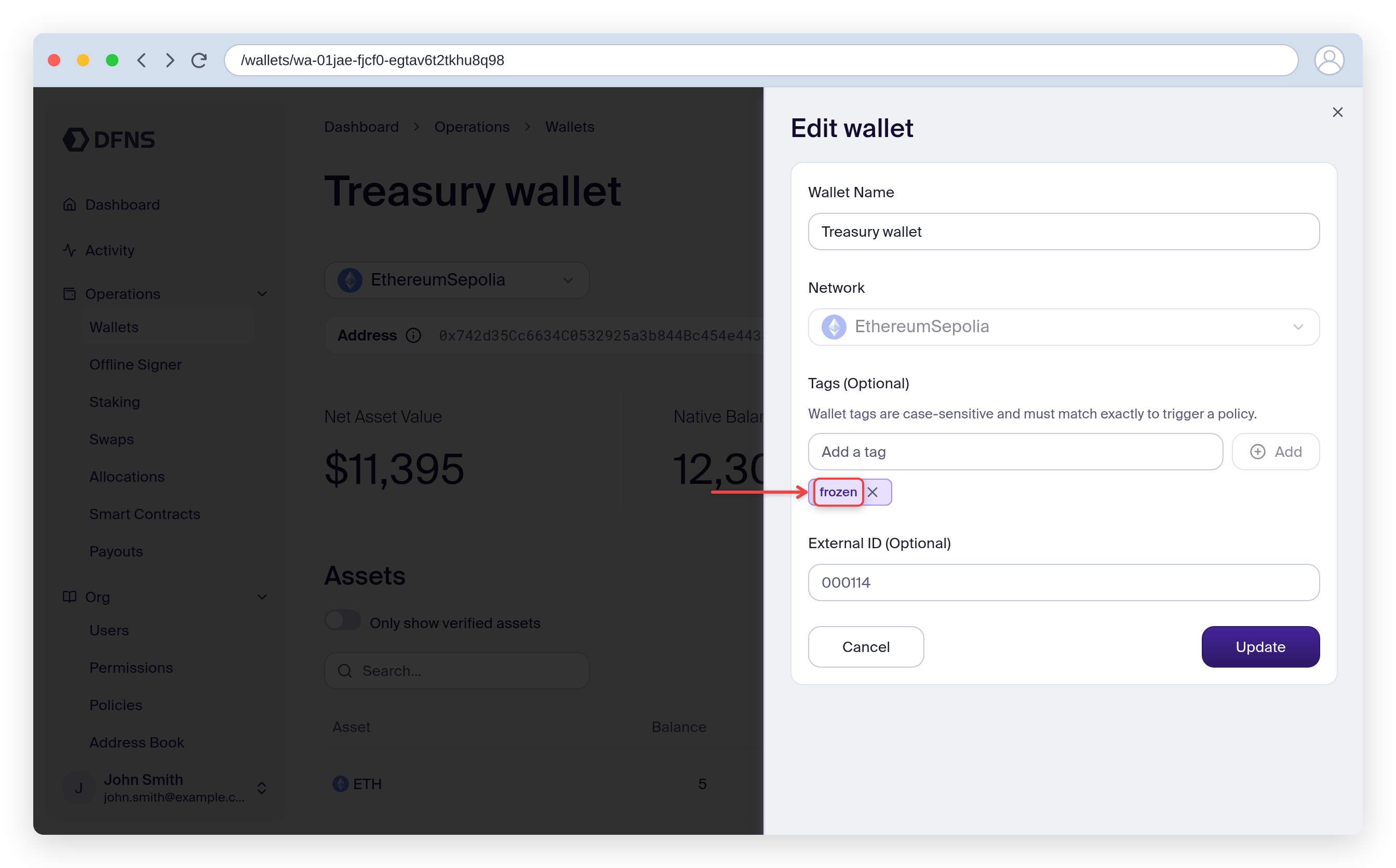
In the **Tags** field, type `frozen` and click **Add**. Then click **Update** to save.
 ### With APIs
```typescript TypeScript theme={null}
await dfns.wallets.tagWallet({
walletId: 'wa-xxx-xxx',
body: { tags: ['frozen'] },
})
```
```python Python theme={null}
dfns.wallets.tag_wallet(
wallet_id="wa-xxx-xxx",
body={"tags": ["frozen"]},
)
```
All outgoing transactions from this wallet will now be blocked.
## Unfreeze a wallet
Remove the `frozen` tag to allow the wallet to transact again.
### From the dashboard
Go to **Wallets** and click the frozen wallet.
Click **Edit** to open the wallet settings.
Click the **x** next to the `frozen` tag to remove it. Then click **Update** to save.
### With APIs
```typescript TypeScript theme={null}
await dfns.wallets.untagWallet({
walletId: 'wa-xxx-xxx',
body: { tags: ['frozen'] },
})
```
```python Python theme={null}
dfns.wallets.untag_wallet(
wallet_id="wa-xxx-xxx",
body={"tags": ["frozen"]},
)
```
The wallet can transact again immediately.
### With APIs
```typescript TypeScript theme={null}
await dfns.wallets.tagWallet({
walletId: 'wa-xxx-xxx',
body: { tags: ['frozen'] },
})
```
```python Python theme={null}
dfns.wallets.tag_wallet(
wallet_id="wa-xxx-xxx",
body={"tags": ["frozen"]},
)
```
All outgoing transactions from this wallet will now be blocked.
## Unfreeze a wallet
Remove the `frozen` tag to allow the wallet to transact again.
### From the dashboard
Go to **Wallets** and click the frozen wallet.
Click **Edit** to open the wallet settings.
Click the **x** next to the `frozen` tag to remove it. Then click **Update** to save.
### With APIs
```typescript TypeScript theme={null}
await dfns.wallets.untagWallet({
walletId: 'wa-xxx-xxx',
body: { tags: ['frozen'] },
})
```
```python Python theme={null}
dfns.wallets.untag_wallet(
wallet_id="wa-xxx-xxx",
body={"tags": ["frozen"]},
)
```
The wallet can transact again immediately.