> ## Documentation Index
> Fetch the complete documentation index at: https://docs.dfns.co/llms.txt
> Use this file to discover all available pages before exploring further.
# Use network testnets
> List of testnets supported by DFNS across each network, with notes on faucets, RPC endpoints, and feature parity with mainnet wallets.
### What is a testnet?
A **testnet** is a blockchain network used for testing purposes. Unlike the mainnet, transactions on testnets use **test tokens**, which have no real-world value.
Examples of popular testnets:
* Ethereum Goerli / Sepolia
* Polygon Mumbai
* Bitcoin Testnet
* Avalanche Fuji
The list of all supported testnets can be found on [the networks page](/networks)
You can create a wallet for a specific blockchain and network using the DFNS dashboard.
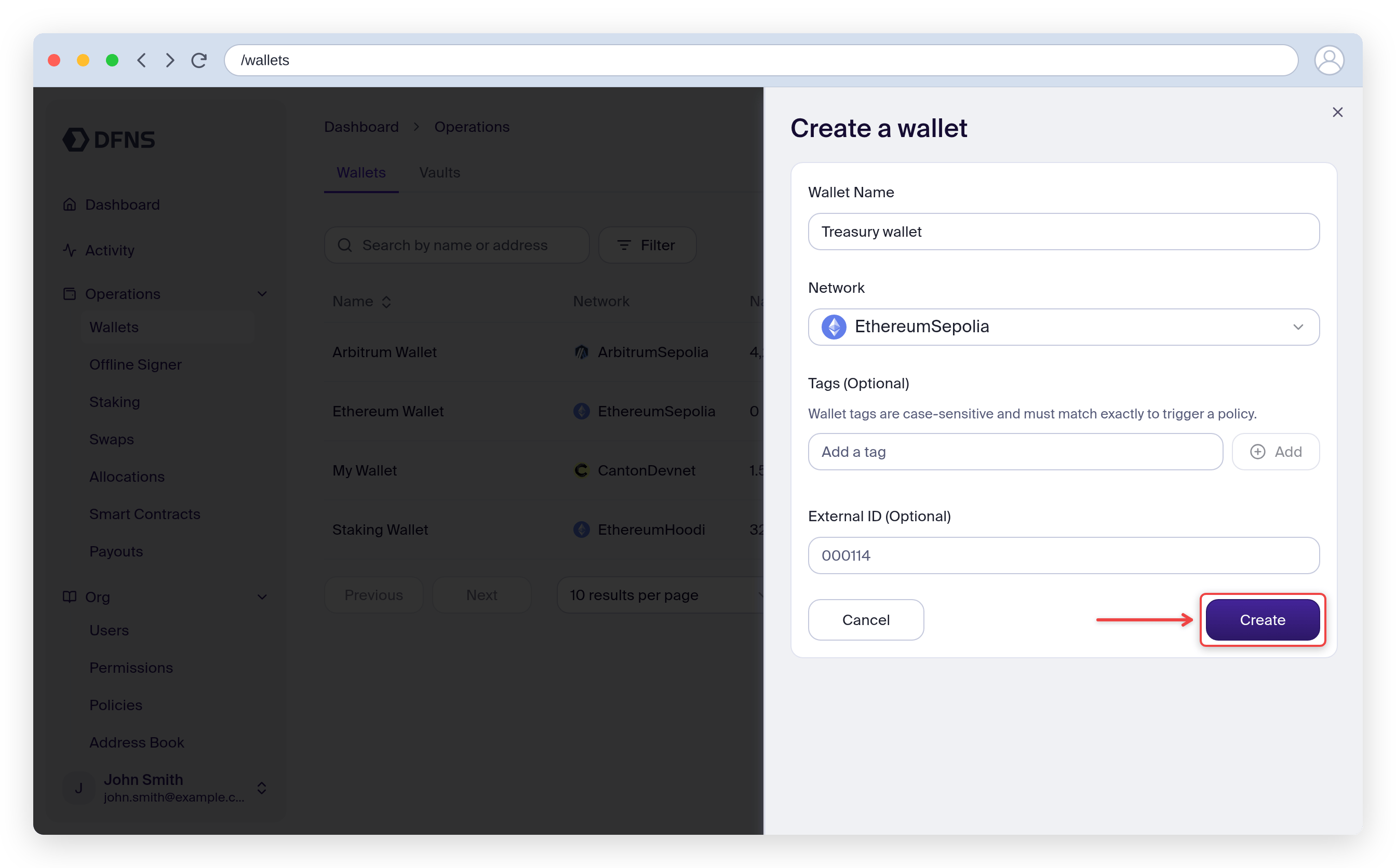
Head to **Operations > Wallets** and click **Create Wallet**. Give it a name, select a testnet network from the list (e.g. StellarTestnet), and click **Create**. Sign the operation with your passkey and you obtain your new wallet.
 Once your wallet is created:
* Go to a **faucet** (test token distributor) for your chosen testnet.
* Provide your DFNS wallet address, visible on the "Address" field on your wallet page
* Receive test tokens for development.
Example Faucets are listed on [the networks page](/networks).
On your wallet page, the new assets/coins balance should be updated quickly.
You can also check that balance using the API: [Get Wallet](/api-reference/wallets/get-wallet)
Now that your wallet has test tokens, you can initiate a transaction.
You’ll need to approve the transaction via your usual DFNS approval flow (e.g., 🔑 passkey, custom policy, etc.).
You can then monitor the status on the wallet page. Once the transaction has been confirmed then it has been validated on the blockchain and is final.
**Security Considerations**
* Do not reuse Testnet wallets for Mainnet usage.
* Treat API keys and credentials securely, even in test environments
* Use approval policies for transaction verification even in test mode.
Once your wallet is created:
* Go to a **faucet** (test token distributor) for your chosen testnet.
* Provide your DFNS wallet address, visible on the "Address" field on your wallet page
* Receive test tokens for development.
Example Faucets are listed on [the networks page](/networks).
On your wallet page, the new assets/coins balance should be updated quickly.
You can also check that balance using the API: [Get Wallet](/api-reference/wallets/get-wallet)
Now that your wallet has test tokens, you can initiate a transaction.
You’ll need to approve the transaction via your usual DFNS approval flow (e.g., 🔑 passkey, custom policy, etc.).
You can then monitor the status on the wallet page. Once the transaction has been confirmed then it has been validated on the blockchain and is final.
**Security Considerations**
* Do not reuse Testnet wallets for Mainnet usage.
* Treat API keys and credentials securely, even in test environments
* Use approval policies for transaction verification even in test mode.