> ## Documentation Index
> Fetch the complete documentation index at: https://docs.dfns.co/llms.txt
> Use this file to discover all available pages before exploring further.
# Policies for signature requests
> How the policy engine evaluates Sign & Broadcast and Generate Signature requests, and how to scope policies and payloads for them.
The DFNS Policy Engine evaluates every signing request before it executes. The outcome depends on the payload format and the rule being applied. This page covers both.
Dashboard transfers always send JSON payloads, so dashboard-only users don't need any of this. The options below can be configured from the dashboard or the API.
## How the policy engine evaluates signing requests
Rules like `TransactionAmountLimit` and `TransactionRecipientWhitelist` evaluate values (amounts, recipients) read from the request payload. The engine extracts those values from structured fields in the request.
**DFNS policies don't introspect raw serialized signature payloads.** When the engine cannot extract the values a rule needs, it stays on the safe side and triggers the rule's action (`Block` or `RequestApproval`, depending on configuration). This fail-closed behavior is by design: rather than let a request through unevaluated, the engine treats the rule as triggered.
## Use JSON payloads for value-based rules
To let the engine evaluate rules like recipient whitelisting or amount limits, use **JSON payloads** with separate fields instead of serialized transaction data.
```json JSON payload (policy engine CAN evaluate) theme={null}
{
"kind": "Transaction",
"transaction": {
"to": "0x00fb58432ef9d418bf6688bcf0a226d2fcaa18e2",
"value": "1000000000000000000",
"data": "0x..."
}
}
```
```json Serialized payload (policy engine CANNOT evaluate) theme={null}
{
"kind": "Transaction",
"transaction": "0x02e783aa36a7..."
}
```
With the JSON format, you can use recipient whitelisting:
```json theme={null}
{
"name": "Whitelist approved addresses",
"activityKind": "Wallets:Sign",
"rule": {
"kind": "TransactionRecipientWhitelist",
"configuration": {
"addresses": [
"0x00fb58432ef9d418bf6688bcf0a226d2fcaa18e2",
"0xa238b6008bc2fbd9e386a5d4784511980ce504cd"
]
}
},
"action": {
"kind": "Block"
}
}
```
Address comparison is case sensitive. For EVM addresses, use the canonical all-lowercase format in your policy configuration, not the mixed-case checksum format.
## Scope policies for signatures without an extractable JSON form
Some signature types, like EIP-712 typed data or complex multi-chain formats, don't have a JSON equivalent with extractable fields. For those, scope your `Wallets:Sign` policy to apply only to wallets that need strict controls. Other wallets bypass the policy entirely.
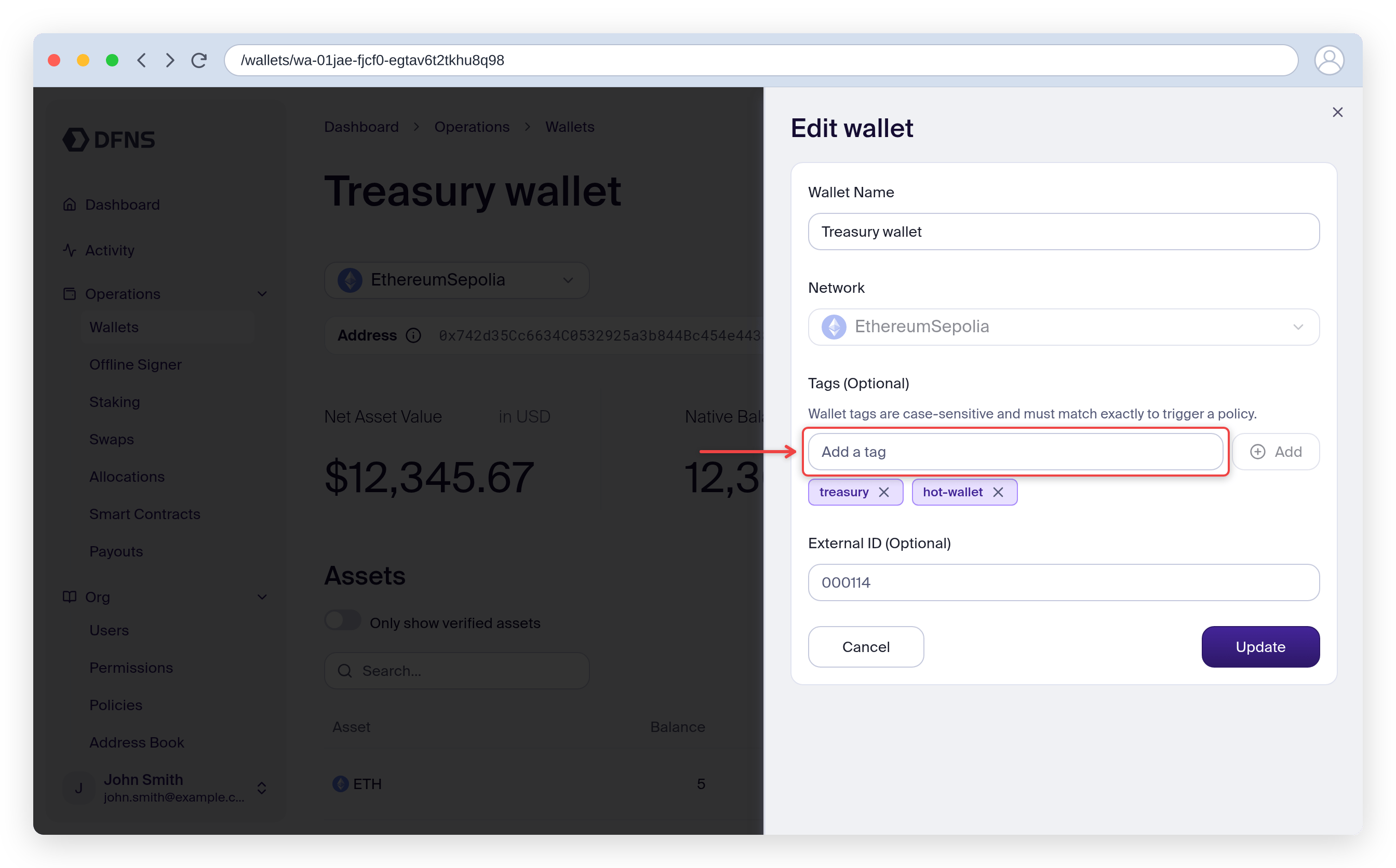
### Tag the wallets
Add a tag like `policy:strict` to wallets that need the policy.
#### From the dashboard
Go to **Wallets** and click the wallet to scope.
Open the actions menu (**⋯**) in the top-right and click **Edit**.
In the **Tags** field, type `policy:strict` and click **Add**, then **Update**.
 #### With the API
```bash theme={null}
curl -X PUT "https://api.dfns.io/wallets/{walletId}/tags" \
-H "Authorization: Bearer $TOKEN" \
-d '{"tags": ["policy:strict"]}'
```
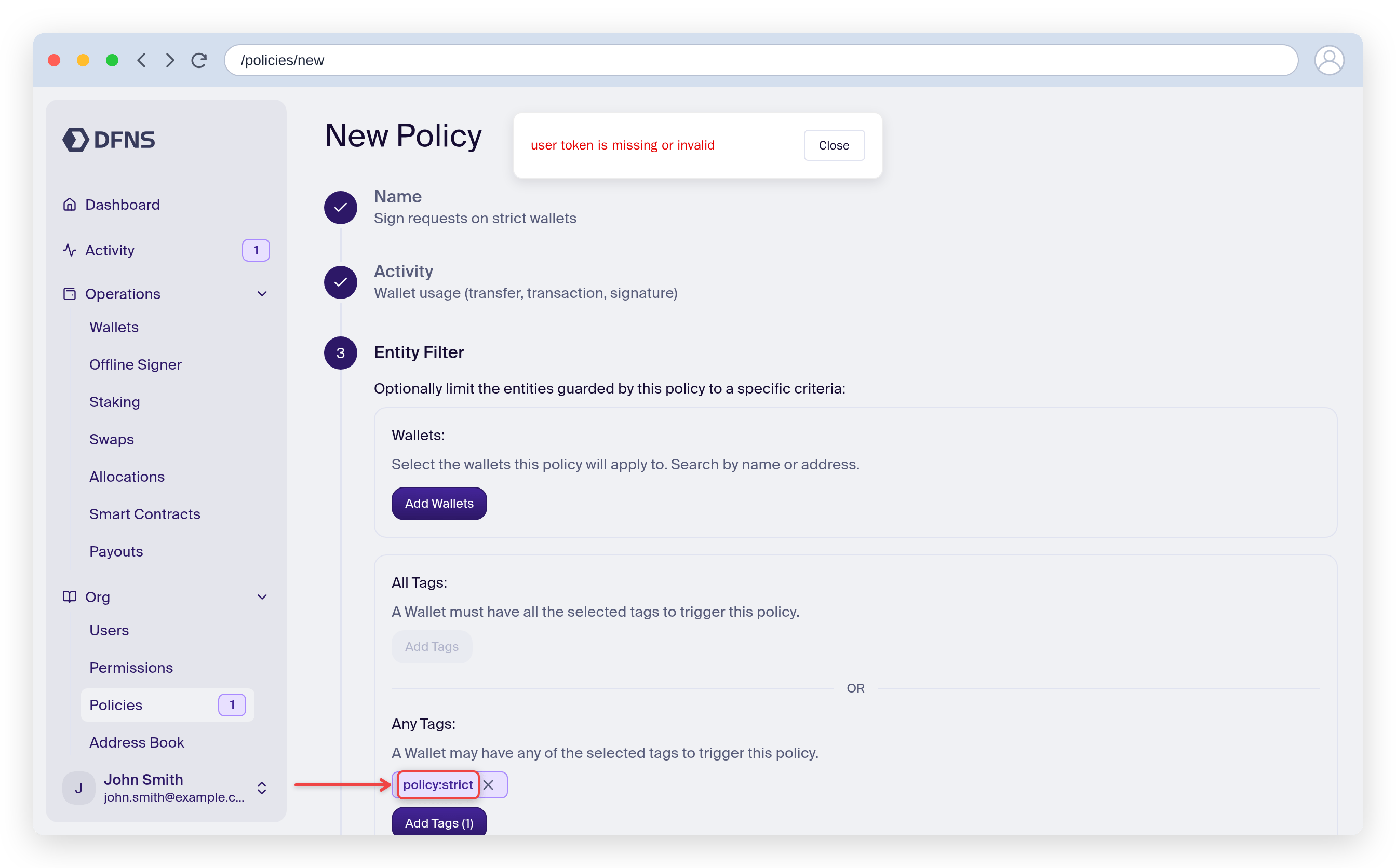
### Create a signing policy scoped to the tag
#### From the dashboard
Go to **Policies** and click **Create Policy**. Name it (for example, `Sign requests on strict wallets`).
Select **Wallet usage (transfer, transaction, signature)**.
On the **Entity Filter** step, under **Any Tags**, click **Add Tags** and add `policy:strict`.
#### With the API
```bash theme={null}
curl -X PUT "https://api.dfns.io/wallets/{walletId}/tags" \
-H "Authorization: Bearer $TOKEN" \
-d '{"tags": ["policy:strict"]}'
```
### Create a signing policy scoped to the tag
#### From the dashboard
Go to **Policies** and click **Create Policy**. Name it (for example, `Sign requests on strict wallets`).
Select **Wallet usage (transfer, transaction, signature)**.
On the **Entity Filter** step, under **Any Tags**, click **Add Tags** and add `policy:strict`.
 Pick the rule (for example, **Transaction recipient whitelist** or **Transaction amount limit**) and the action (**Block** or **Request approval**).
Review the summary and click **Save**.
#### With the API
```json theme={null}
{
"name": "Require approval for large transfers",
"activityKind": "Wallets:Sign",
"rule": {
"kind": "TransactionAmountLimit",
"configuration": {
"limit": 10000,
"currency": "USD"
}
},
"action": {
"kind": "RequestApproval",
"approvalGroups": [{ "quorum": 1, "approvers": {} }]
},
"filters": {
"walletTags": {
"hasAny": ["policy:strict"]
}
}
}
```
Wallets without the `policy:strict` tag won't trigger this policy.
### Filter by wallet ID instead
For simpler setups, the API supports filtering by specific wallet IDs:
```json theme={null}
{
"filters": {
"walletId": {
"in": ["wa-treasury-xxx", "wa-operations-xxx"]
}
}
}
```
The dashboard policy builder filters by tag rather than wallet ID, so use tags if you need this filter to be configurable from the dashboard.
## Security considerations
When excluding wallets from policies:
* **Fund with limited amounts**: only keep what's needed for operations.
* **Use separate wallets**: don't mix automated signing wallets with treasury.
* **Monitor with webhooks**: track signing activity.
* **Audit regularly**: review which wallets are excluded from policies.
## Related resources
Learn how the Policy Engine works
Organize wallets with tags
Transaction broadcast API reference
Signature generation API reference
Pick the rule (for example, **Transaction recipient whitelist** or **Transaction amount limit**) and the action (**Block** or **Request approval**).
Review the summary and click **Save**.
#### With the API
```json theme={null}
{
"name": "Require approval for large transfers",
"activityKind": "Wallets:Sign",
"rule": {
"kind": "TransactionAmountLimit",
"configuration": {
"limit": 10000,
"currency": "USD"
}
},
"action": {
"kind": "RequestApproval",
"approvalGroups": [{ "quorum": 1, "approvers": {} }]
},
"filters": {
"walletTags": {
"hasAny": ["policy:strict"]
}
}
}
```
Wallets without the `policy:strict` tag won't trigger this policy.
### Filter by wallet ID instead
For simpler setups, the API supports filtering by specific wallet IDs:
```json theme={null}
{
"filters": {
"walletId": {
"in": ["wa-treasury-xxx", "wa-operations-xxx"]
}
}
}
```
The dashboard policy builder filters by tag rather than wallet ID, so use tags if you need this filter to be configurable from the dashboard.
## Security considerations
When excluding wallets from policies:
* **Fund with limited amounts**: only keep what's needed for operations.
* **Use separate wallets**: don't mix automated signing wallets with treasury.
* **Monitor with webhooks**: track signing activity.
* **Audit regularly**: review which wallets are excluded from policies.
## Related resources
Learn how the Policy Engine works
Organize wallets with tags
Transaction broadcast API reference
Signature generation API reference