> ## Documentation Index
> Fetch the complete documentation index at: https://docs.dfns.co/llms.txt
> Use this file to discover all available pages before exploring further.
# Global Ledger
> Screen outbound transactions with Global Ledger's blockchain analytics and KYT services, enforced through DFNS policies before signing.
export const Loom = props => {
return ;
};
[Global Ledger](https://globalledger.io/) is a blockchain analytics company providing AML compliance and KYT (Know Your Transaction) solutions. Their platform supports over 2,000 digital assets and delivers real-time risk scoring for transaction screening.
## Setup
In the DFNS Dashboard, navigate to **Integrations**, find the **Global Ledger** card, and click **Configure**.
Toggle **Activated**, then enter your **Global Ledger API key** (encrypted at rest and in transit). If you run an on-prem deployment, optionally set a **Custom base domain** and the **Supported Blockchains**.
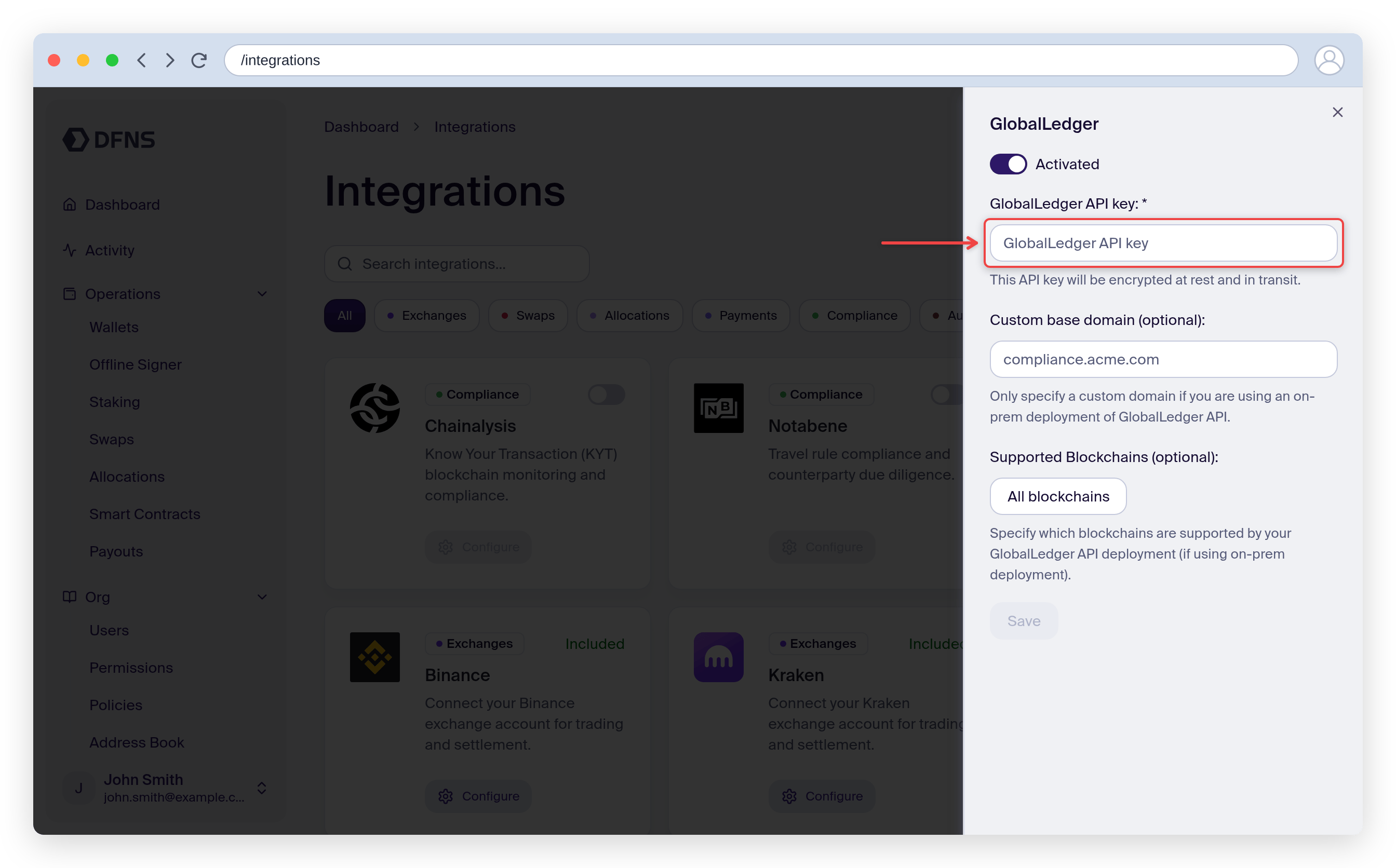 Click **Save**. The integration is now active, and the Global Ledger prescreening rule becomes available in the policy builder.
## Outbound transfer prescreening
Outbound transfers can be screened by Global Ledger before they are broadcast on-chain. Create a policy that runs the Global Ledger prescreening rule on wallet activity.
### From the dashboard
Go to **Policies**, click **Create Policy**, give it a name, and select the **Wallet usage (transfer, transaction, signature)** activity.
On the **Rule** step, choose **Transaction attempt prescreening (GlobalLedger)**. Set the **Risk score threshold** (0-100, where the policy triggers when the score meets or exceeds it) and toggle the [skip options](#skip-options) as needed.
Click **Save**. The integration is now active, and the Global Ledger prescreening rule becomes available in the policy builder.
## Outbound transfer prescreening
Outbound transfers can be screened by Global Ledger before they are broadcast on-chain. Create a policy that runs the Global Ledger prescreening rule on wallet activity.
### From the dashboard
Go to **Policies**, click **Create Policy**, give it a name, and select the **Wallet usage (transfer, transaction, signature)** activity.
On the **Rule** step, choose **Transaction attempt prescreening (GlobalLedger)**. Set the **Risk score threshold** (0-100, where the policy triggers when the score meets or exceeds it) and toggle the [skip options](#skip-options) as needed.
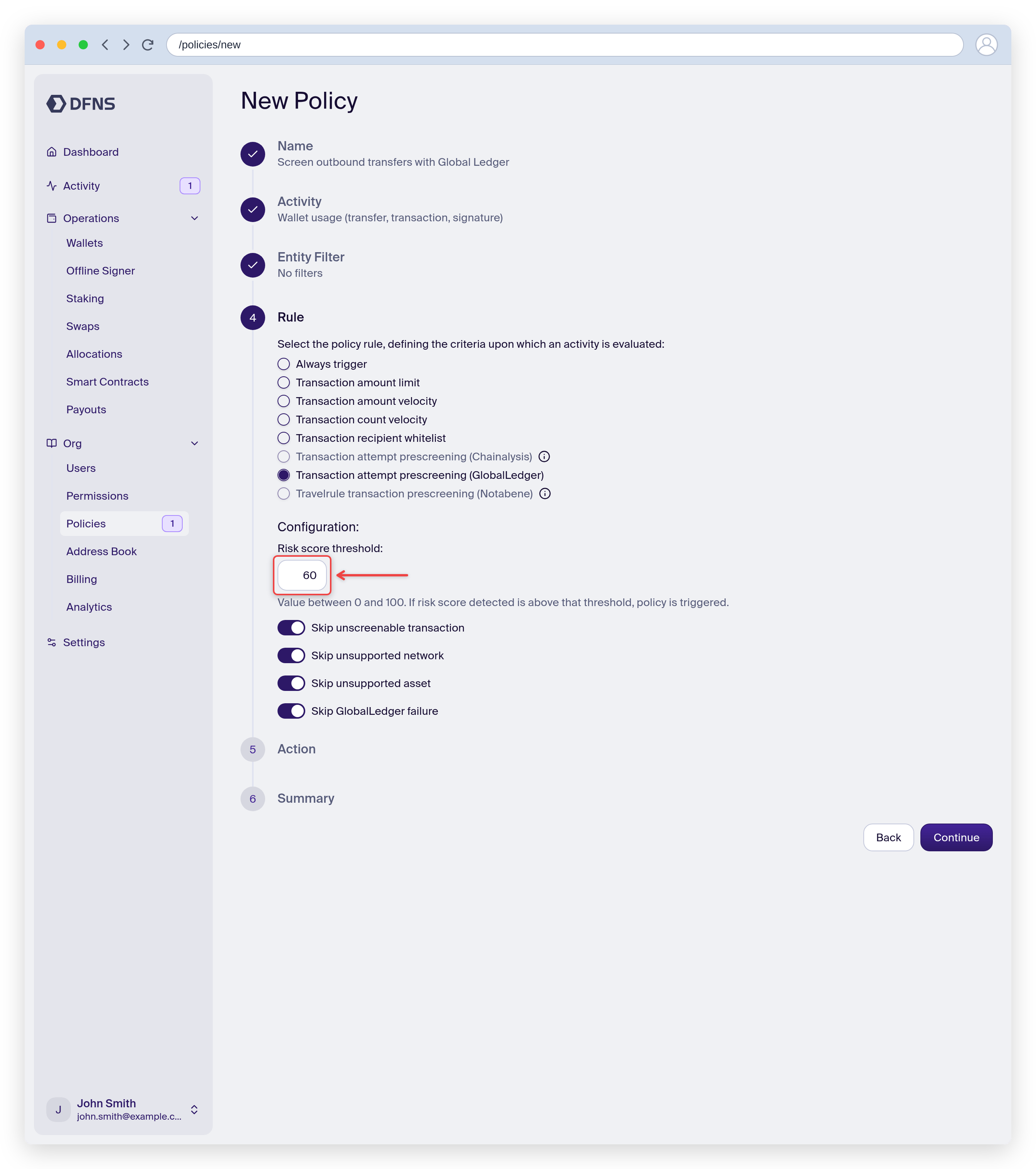 Pick the action taken when the rule triggers, then review and **Save**. You can scope the policy to specific wallets or [tags](/guides/signing-policies).
### With the API
Create a policy with:
* Activity kind: [`Wallets:Sign`](/api-reference/policies#walletssign-activity)
* Rule kind: [`GlobalLedgerTransactionPrescreening`](/api-reference/policies#globalledgertransactionprescreening-policy-rule)
* Action kind: [`Block`](/api-reference/policies#block-policy-action), [`RequestApproval`](/api-reference/policies#requestapproval-policy-action), or [`NoAction`](/api-reference/policies#noaction-policy-action)
### When the policy triggers
The policy triggers when either:
* The transaction's risk score meets or exceeds your configured `riskScoreThreshold` (0-100 scale, where 100 is highest risk)
* Global Ledger returns any alerts for the transaction (alerts are configured in your [Global Ledger dashboard](https://globalledger.io/))
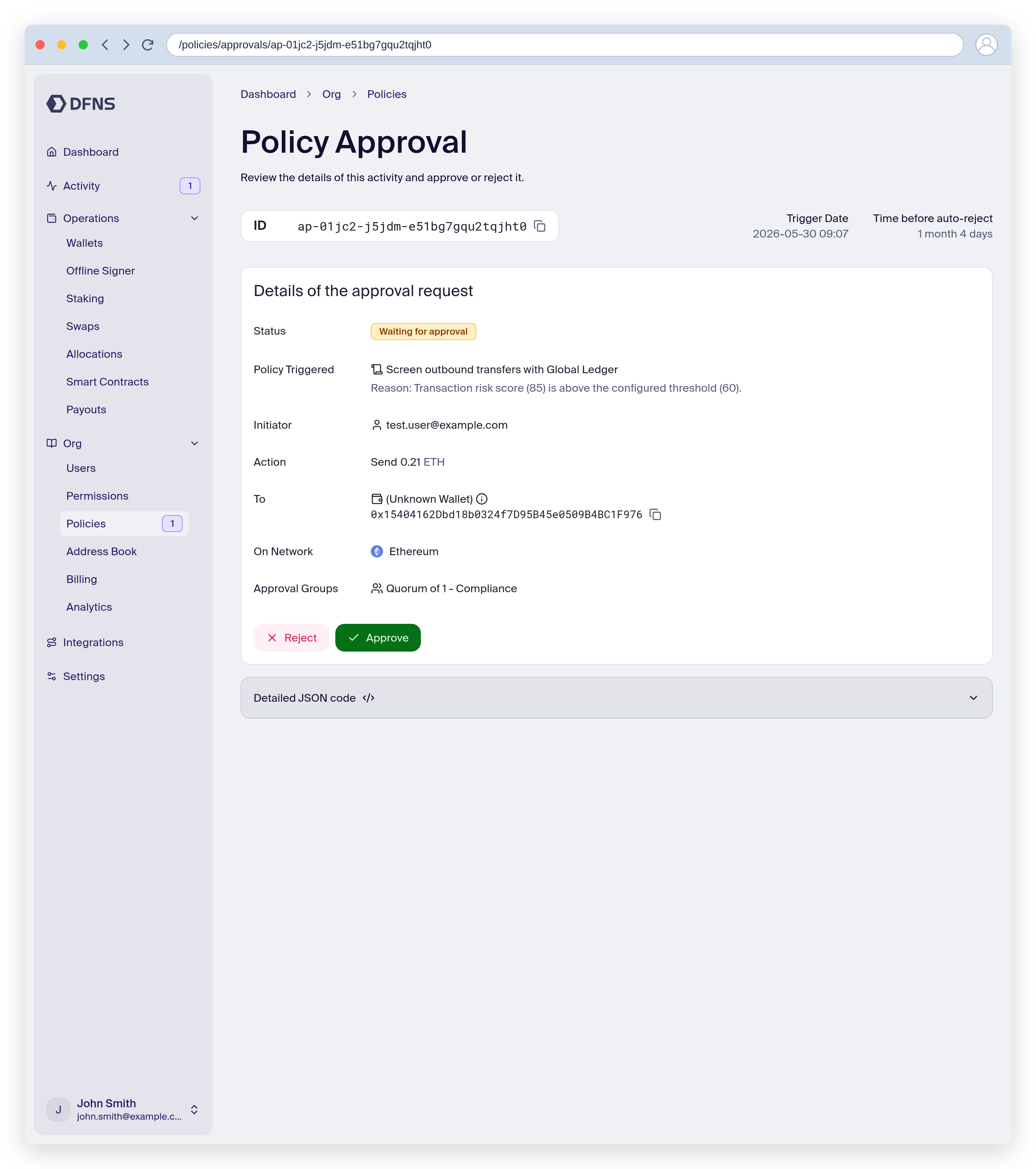
When the action is `RequestApproval`, the flagged transfer stays pending until an approver reviews it. The approval page shows the triggered policy and the reason, and expands "Evaluation details" with the full response from Global Ledger, including risk scores and any alerts.
Pick the action taken when the rule triggers, then review and **Save**. You can scope the policy to specific wallets or [tags](/guides/signing-policies).
### With the API
Create a policy with:
* Activity kind: [`Wallets:Sign`](/api-reference/policies#walletssign-activity)
* Rule kind: [`GlobalLedgerTransactionPrescreening`](/api-reference/policies#globalledgertransactionprescreening-policy-rule)
* Action kind: [`Block`](/api-reference/policies#block-policy-action), [`RequestApproval`](/api-reference/policies#requestapproval-policy-action), or [`NoAction`](/api-reference/policies#noaction-policy-action)
### When the policy triggers
The policy triggers when either:
* The transaction's risk score meets or exceeds your configured `riskScoreThreshold` (0-100 scale, where 100 is highest risk)
* Global Ledger returns any alerts for the transaction (alerts are configured in your [Global Ledger dashboard](https://globalledger.io/))
When the action is `RequestApproval`, the flagged transfer stays pending until an approver reviews it. The approval page shows the triggered policy and the reason, and expands "Evaluation details" with the full response from Global Ledger, including risk scores and any alerts.
 ### Skip options
The rule includes options to handle edge cases:
| Option | Description |
| ----------------------------- | ------------------------------------------------------------------- |
| `skipUnscreenableTransaction` | Skip wallet requests that cannot be screened (e.g., raw signatures) |
| `skipUnsupportedNetwork` | Skip transfers to networks not supported by the integration |
| `skipUnsupportedAsset` | Skip transfers of assets not supported by the integration |
| `skipGlobalLedgerFailure` | Skip if the Global Ledger API request fails |
When a skip option is enabled and the condition is met, the policy does not trigger and the transaction proceeds.
### Webhook events
When the policy triggers, the screening results are included in the [`policy.triggered`](/api-reference/webhook-events) webhook event.
## Supported networks
Global Ledger supports major blockchains including Bitcoin, Ethereum, Tron, BNB Chain, Solana, and more. For the complete list of supported networks and assets, see [Global Ledger's documentation](https://globalledger.io/kyt).
If you're using an on-prem deployment of Global Ledger, you can specify which blockchains your deployment supports in the Dashboard integration settings.
### Skip options
The rule includes options to handle edge cases:
| Option | Description |
| ----------------------------- | ------------------------------------------------------------------- |
| `skipUnscreenableTransaction` | Skip wallet requests that cannot be screened (e.g., raw signatures) |
| `skipUnsupportedNetwork` | Skip transfers to networks not supported by the integration |
| `skipUnsupportedAsset` | Skip transfers of assets not supported by the integration |
| `skipGlobalLedgerFailure` | Skip if the Global Ledger API request fails |
When a skip option is enabled and the condition is met, the policy does not trigger and the transaction proceeds.
### Webhook events
When the policy triggers, the screening results are included in the [`policy.triggered`](/api-reference/webhook-events) webhook event.
## Supported networks
Global Ledger supports major blockchains including Bitcoin, Ethereum, Tron, BNB Chain, Solana, and more. For the complete list of supported networks and assets, see [Global Ledger's documentation](https://globalledger.io/kyt).
If you're using an on-prem deployment of Global Ledger, you can specify which blockchains your deployment supports in the Dashboard integration settings.