Architecture overview
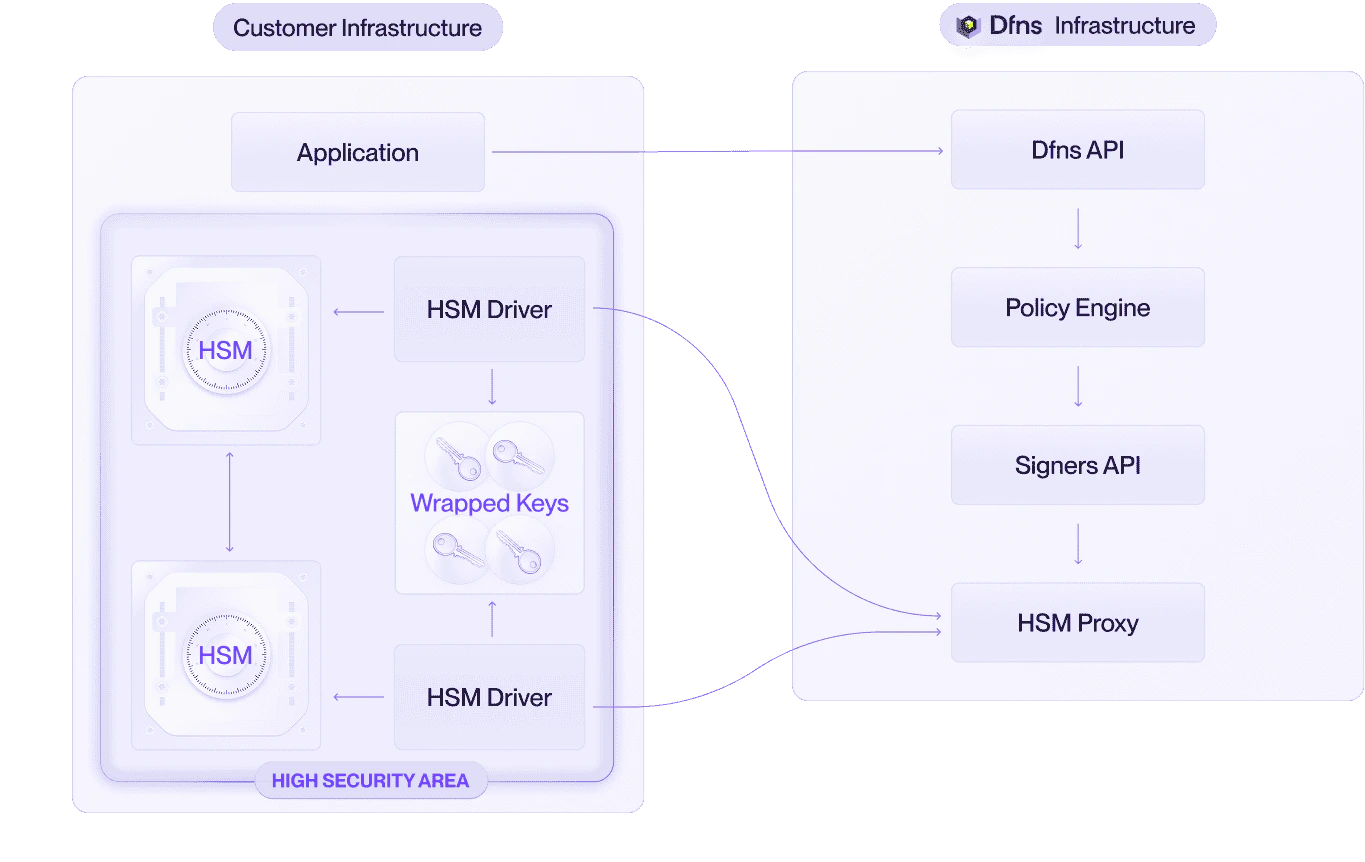
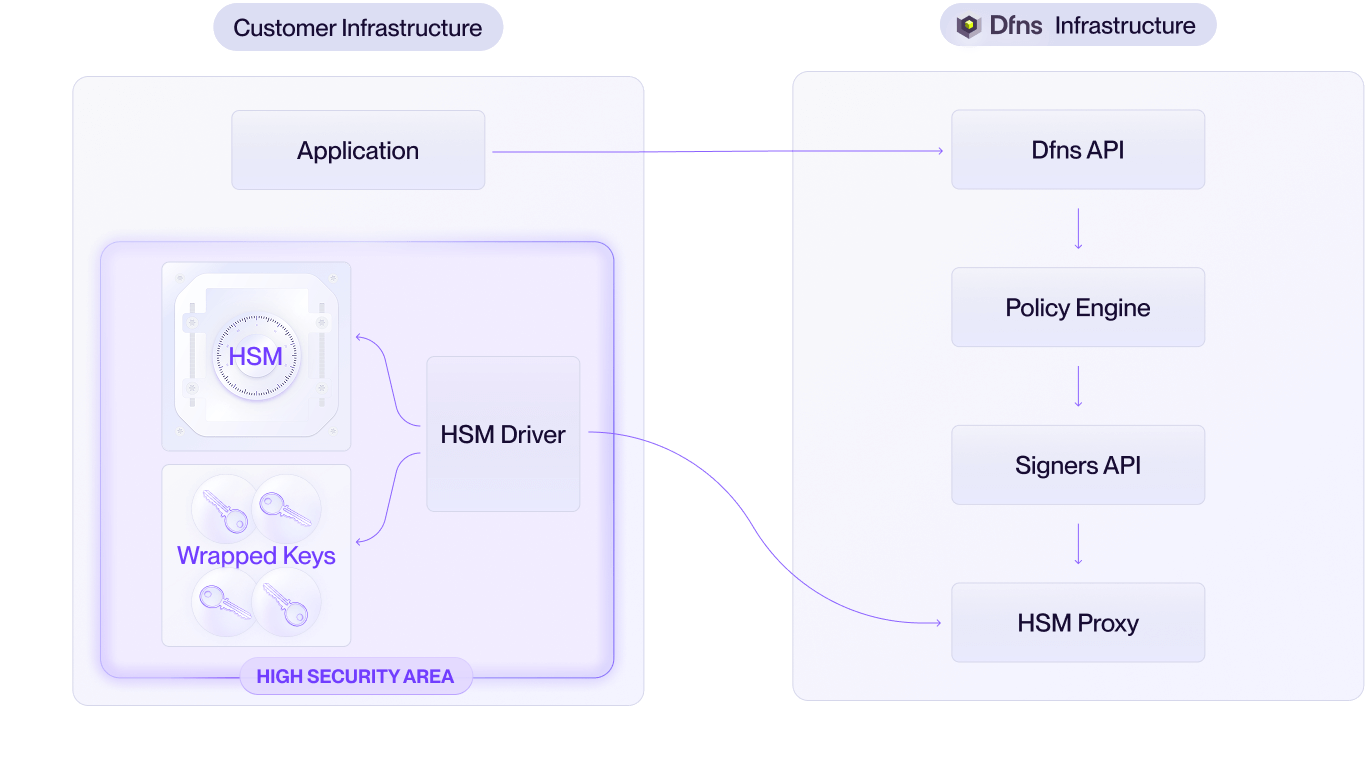
The HSM deployment model consists of four components running in your infrastructure:| Component | Description |
|---|---|
| HSM | A Hardware Security Module that you procure and manage. It performs cryptographic operations and protects your master key. Any HSM supporting PKCS#11 is compatible. |
| Host server | The machine running the HSM Driver and database. It must have network connectivity to both the internet (to reach Dfns APIs) and your HSM. |
| HSM Driver | Software provided by Dfns that bridges the Dfns API and your HSM. It polls the API for signing requests and translates them into PKCS#11 commands. |
| Database | A database that stores wrapped (encrypted) keys. The HSM Driver reads and writes to this database during key generation and signing operations. |
Dfns does not participate in the administration or management of the customer’s HSM.All HSM-related operations, including provisioning, configuration, and master key management, are handled exclusively by the customer. This ensures that Dfns personnel have no access to the cryptographic keys, aligning with strict security and compliance requirements.
HSM usage
To maximize compatibility and flexibility, Dfns employs a stateless approach to HSM usage. This design eliminates the need for persistent key storage within the HSM, simplifying integration and enhancing disaster recovery capabilities. This also ensures that the HSM does not need to maintain key state, enabling compatibility with a broad range of HSMs and simplifying key management.Key generation
1
Poll for request
The HSM Driver polls the Dfns APIs and retrieves a key generation request.
2
Forward to HSM
It forwards the request to the HSM, which generates a new cryptographic key.
3
Wrap the key
The HSM wraps (encrypts) the key using its master key, producing a wrapped key.
4
Store wrapped key
The HSM Driver retrieves the wrapped key and stores it in a secure database for backup and future use.
Transaction signing
1
Poll for signing request
The HSM Driver polls the Dfns APIs and retrieves a signing request, including the payload to be signed.
2
Retrieve wrapped key
It retrieves the corresponding wrapped key from the database.
3
Send to HSM
The HSM Driver sends the wrapped key and the payload to the HSM.
4
Sign the payload
The HSM unwraps (decrypts) the key using its master key, performs the signature operation, and returns the signed payload to the HSM Driver.
5
Forward signed payload
The HSM Driver forwards the signed payload to the Dfns APIs for processing.
HSM Driver
The HSM Driver is a specialized component designed to facilitate secure integration between Dfns APIs and HSMs. It provides deep compatibility with the PKCS#11 standard, enabling seamless interaction with a wide range of HSM models from various vendors. The HSM Driver operates as a bridge, handling key generation and signing requests while ensuring state-of-the-art security and operational flexibility. The HSM Driver has two primary functionalities:- Polling Dfns APIs: The HSM Driver continuously polls the Dfns APIs to retrieve requests for generating new keys or signing transactions using existing keys. The connection between the HSM Driver and Dfns APIs is secured using mutual Transport Layer Security (mTLS) with strong authorization mechanisms, ensuring end-to-end encryption and authentication.
- Interfacing with HSMs via PKCS#11: The HSM Driver translates API requests into PKCS#11 commands to interact with the HSM. This abstraction allows the HSM Driver to support diverse HSM models without requiring specific hardware configurations.
Horizontal scaling and redundancy
The HSM Driver and HSM integration are designed for horizontal scaling to support high availability and business continuity. Customers can deploy multiple HSMs and HSM Driver instances to handle increased load or ensure redundancy. The only requirements for scaling are:- All HSMs must be provisioned with the same master key to unwrap keys consistently.
- All HSM Driver instances must have access to the same database containing the wrapped keys.
Active-active configuration
Instead of relying on a single processing chain (one server, one HSM), the architecture supports multiple, independent HSM Drivers running in parallel. Each HSM Driver can be paired with its own HSM. All deployed HSM Drivers connect to the Dfns API simultaneously, independently polling for jobs.Queue-based load distribution
The Dfns API maintains a queue of incoming requests. Each active HSM Driver connects to poll for the next available job. This pull-based model provides:- Natural load distribution: The next job is always taken by the next available server, distributing work across all healthy instances.
- Intrinsic fault tolerance: If an HSM Driver or its paired HSM fails, it simply stops polling. The API and its request queue are unaffected. The remaining healthy HSM Drivers continue processing requests without any service interruption or need for manual failover.
Automatic recovery
When a failed HSM or HSM Driver is repaired and brought back online, it simply resumes connecting to the API and polling for available jobs. It is automatically re-integrated into the active processing pool without requiring any manual intervention or API-side configuration.Deployment options
The HSM Driver is a flexible component that can be deployed on the customer’s infrastructure, offering multiple packaging and deployment options:- Container Image: The HSM Driver can be provided as a Docker container image, enabling easy deployment in containerized environments such as Kubernetes or Docker Swarm.
- Standalone Binary: For environments without containerization, the HSM Driver is available as a standalone binary, compatible with common operating systems.
- Co-Located Deployment: The HSM Driver can be run on the same machine as the HSM to minimize latency and enhance security by reducing network exposure.
- Cloud-Based HSM Support: Customers can opt for cloud-based HSMs (e.g., AWS CloudHSM, Azure Key Vault HSM, Google Cloud HSM) if they prefer a managed HSM solution.
Integration steps
To integrate an HSM with Dfns, customers must perform the following steps:1
Obtain the HSM Driver
Contact Dfns to acquire the HSM Driver component, available as a container image or standalone binary.
2
Generate mTLS certificates
Sync with Dfns to configure mTLS certificates for secure communication between the HSM Driver and Dfns APIs. Ensure that the certificates are properly provisioned and validated.
3
Deploy the HSM Driver
Install and configure the HSM Driver on the customer’s infrastructure, ensuring connectivity to the HSM and the wrapped key database.
4
(Optional) Provision the HSM
If using a new HSM, configure the HSM with a master key and ensure it supports PKCS#11. If using multiple HSMs, provision them with the same master key.
5
Run the HSM Driver
Start the HSM Driver, which will begin polling Dfns APIs and processing key generation and signing requests via the HSM.
Backup and disaster recovery
The wrapped keys stored in the database are encrypted with the HSM’s master key, ensuring that they remain secure even if the database is compromised. The database can be backed up and replicated across multiple locations, providing robust disaster recovery capabilities. In the event of an HSM failure, a new HSM provisioned with the same master key can access the wrapped keys from the database, allowing seamless recovery without key loss.The HSM and database are run in your infrastructure. You are responsible for maintaining them operational!The HSM master keys are highly sensitive and should be replicated or backed up accordingly. The keys database only contains wrapped keys, so if you loose the master key then you loose the ability to use all wallets!
Security considerations
- mTLS Authentication: The use of mTLS between the HSM Driver and Dfns APIs ensures that only authorized components can communicate, preventing unauthorized access.
- Wrapped Key Encryption: Keys stored in the database are encrypted with the HSM’s master key, rendering them unusable without access to the HSM.
- Customer-Controlled HSM: By managing the HSM independently, customers retain full control over their cryptographic keys, ensuring compliance with internal security policies.
- Stateless Design: The stateless approach minimizes the attack surface on the HSM and simplifies key recovery in case of hardware failure.